

Tutorial
Check Every Booth QR Code Before It Goes to Print
For events, booth and field marketing staff at large defense and space primes with strict security policies: run eight checks on every QR code printed on a backdrop, handout, kiosk or sign, so a cautious government or prime visitor can trust it, and use the companion lab to see which codes to fix before the print order goes out.
Time needed: About 30 minutes for a booth with eight printed codes, plus a few minutes at setup and each show morning
Before you start:
- The print proofs for every booth item that carries a QR code: backdrop, handouts, kiosk screens, signs and cards
- A company phone, and the address each code is meant to open
- The name of the booth staffer who will look at the printed codes at setup and on each show day
Events Trade Shows Security Qr Codes Defense Space
Who this is for: events, booth and field marketing staff at one of the largest defense or space primes, working under strict security policies. You print QR codes on banners, handouts, kiosk screens and signs for shows where many visitors are government and prime employees, and those visitors are told to be careful with codes they find in public places. A box for small contractors and startups follows the list of mistakes.
These booth checks are a teaching aid and do not replace a security review. Your company’s security team decides whether a printed code may go out.
Teaching example: Invented Torvanne Aerospace, its booth, its eight printed codes and every answer in the lab are made up. No real company, show, address or QR code is shown, and the lab draws no QR images.
One booth, code by code
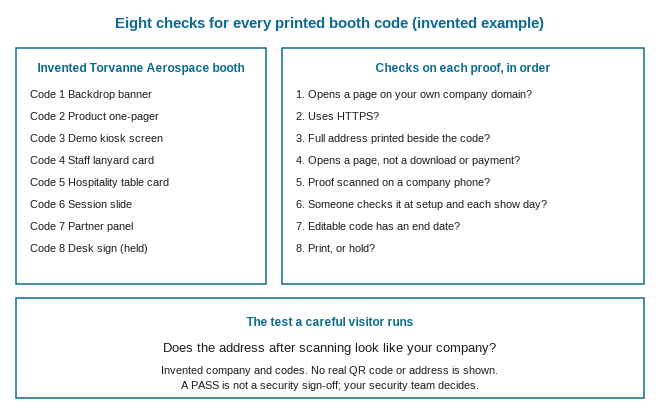
Invented Torvanne Aerospace’s booth proofs are due at the printer tonight. There is a code on the backdrop banner, one on the product one-pager, one on the demo kiosk screen, one on the staff lanyard cards, one on the hospitality suite table cards, one on a conference session slide, one on a panel shared with a teaming partner, and one on a registration desk sign that is still on hold. One was made months ago, and nobody is sure where it points.
Now think about who scans at a defense show. Many of the people the booth most wants to reach work for the government or for another prime, and public security guidance tells them to be wary. The Canadian Centre for Cyber Security lists, under “Actions to avoid”, “Scanning a QR code posted in a public setting, such as in a public transit station or advertisements on the street.” (Canadian Centre for Cyber Security, ITSAP.00.141). The FBI tells people who scan: “Once you scan a QR code, check the URL to make sure it is the intended site and looks authentic.” (FBI IC3, I-011822-PSA).
So the booth code has to pass the checks a careful visitor will run: eight checks per printed code, done on the proof, before the order goes out. No AI tool is involved, and the lab adds no AI step.
The companion article, Who Owns AI-Made Marketing Work Depends on the Country, looks at a different question for the same booth graphics: who owns them. This tutorial stays with the codes printed on them.
Why booth codes get swapped
The FBI’s 2022 announcement is direct about the motive: “Cybercriminals are tampering with QR codes to redirect victims to malicious sites that steal login and financial information.” (FBI IC3). It adds that “Cybercriminals tamper with both digital and physical QR codes to replace legitimate codes with malicious codes.” (FBI IC3).
A printed code is easy to cover. The FBI tells scanners: “If scanning a physical QR code, ensure the code has not been tampered with, such as with a sticker placed on top of the original code.” (FBI IC3). Canada’s list of actions to avoid includes “Scanning a QR code if it is printed on a label that could be covering another QR code.” (Canadian Centre for Cyber Security). A sticker over a booth code costs almost nothing, which is why somebody has to look at every code once the booth is up.
None of these sources gives a rate for how often booth codes are swapped, and this tutorial prints none. What we do know is that people scan codes they find on posted paper. In a four-week study of QR code phishing in early 2012, Carnegie Mellon University researchers posted flyers at 139 locations on campus and around Pittsburgh, and the flyers “were scanned by 225 individuals who subsequently visited the associated websites” (Vidas et al., Carnegie Mellon University, Lecture Notes in Computer Science, 2013). That was one study in one city with flyers, not booth materials, and it measures scanning, not tampering.
The steps
-
Point the code at a page on your company’s own domain. A visitor following the FBI’s advice will look at the address after scanning. If the code goes through a third-party QR service or a link shortener, the address on the visitor’s screen does not name your company, so that check cannot succeed. That is our reading of the FBI advice, not a sentence in it. In the lab, a redirect or shortened link is VERIFY R7.
-
Make sure the address uses HTTPS. The Cyber Security NSW QR code fact sheet tells organisations to “verify that the URLs linked to QR codes use TLS/SSL encryption.” (Cyber Security NSW, QR code fact sheet). We apply it to a defense booth as our own rule. A code going to print with an HTTP-only address is VERIFY R1, labeled “(Our rule, drawn from Cyber Security NSW advice)”. Change the link to an HTTPS address and scan the proof again.
-
Print the full address beside the code. UBC’s guide for its own faculty, staff and students says: “Provide the full URL alongside the QR code for users who cannot scan it.” (UBC). A U.S. Department of Energy page on QR code standards says: “Include what the QR code links to (the original URL, email address, etc.) in text adjacent to the code.” (U.S. Department of Energy). A visitor who will not scan can still type it. A short, partial or missing address is VERIFY R8. One note: the same Department of Energy page also suggests printing a shortened version of the link under the code (U.S. Department of Energy). That cuts against step 1, so this tutorial follows the full-address advice and treats shortened links as a VERIFY.
-
Scan the printed proof yourself. UBC says: “Use a QR code reader to scan the code and check the resulting URL.” (UBC). The Department of Energy page lists, among its best practices, “Testing the QR code with your mobile phone” (U.S. Department of Energy). Use a company phone and confirm the proof opens the page you meant. A proof nobody scanned is VERIFY R9.
-
Do not use a code to start a download or take a payment. The FBI tells people who scan: “Do not download an app from a QR code.” (FBI IC3). It also advises: “Avoid making payments through a site navigated to from a QR code.” (FBI IC3). Visitors who follow that advice will stop, so a code that starts an app or file download is VERIFY R5, and one that opens a payment page is VERIFY R6. Point the code at a company page instead. For the app side of a show, see Send the Event App to IT Before Anyone Installs It.
-
If the code opens a form, ask for less. UBC says: “Using QR codes to link to forms that collect personal information should be avoided. If necessary, be transparent about the data being collected and limit it to what’s essential.” (UBC). Ask only for what the follow-up needs, and say who will receive it. A contact form is VERIFY R12.
-
Name who checks every printed code on site. The Cyber Security NSW fact sheet tells organisations to “regularly check deployed QR codes for any signs of tampering or misuse.” (Cyber Security NSW). We apply it to a defense booth as our own rule. UBC adds, for event materials: “If using QR codes on event materials (roll-up banners, backdrops, table-top materials, etc.), ensure materials are regularly checked for tampering.” (UBC). A code going to print with no check planned is VERIFY R2, labeled “(Our rule, drawn from Cyber Security NSW advice)”. A check at setup only is VERIFY R10: add a look each show morning.
-
Give an editable code an end date. The fact sheet describes dynamic codes as “Editable codes that can be updated after being generated, allowing changes to the linked content.” (Cyber Security NSW). It tells organisations to “implement expiry times for dynamic QR codes to prevent unauthorised reuse.” (Cyber Security NSW). We apply it to a defense booth as our own rule. A code that can be repointed after printing keeps working for whoever controls it next, so a dynamic code with no end date is VERIFY R11, labeled “(Our rule, drawn from Cyber Security NSW advice)”. Set an end date after the show, or use a static code.
-
Settle partner pages and held codes, then fill in every answer. VERIFY R13, labeled “(Our rule)”, fires when a code opens a partner’s or the show organizer’s site: confirm with them in writing which page it is, that it stays up through the show, and who answers questions about it. A held code that still has an HTTP-only address or no on-site check is VERIFY R4, labeled “(Our rule, drawn from Cyber Security NSW advice)”, so the problem is fixed before anyone releases the hold. A blank answer, or one that is not on its list, is VERIFY R3, labeled “(Our rule)”.
Try it now: open the booth QR code check lab. The lab loads Case B first. Look at Code 2, the product one-pager: its address is HTTP only and no address is printed beside it, so VERIFY R1 fires first, with R8 listed with it. Code 4, the lanyard card, uses a shortened link: VERIFY R7. Code 5, the hospitality table card, was never test-scanned: VERIFY R9. Then load Case F and watch Code 6, the session slide, which matches both R1 and R2.
The worked example
In Case B, Torvanne’s events lead goes through the proofs code by code. The one-pager code opens an HTTP-only page and has no address printed: VERIFY R1, also matching R8, so the link moves to an HTTPS page on the company domain and the full address goes under the code. The lanyard card’s code runs through a shortener: VERIFY R7, so it is remade to point straight at the company page. The hospitality table card was never scanned: VERIFY R9, so someone scans the proof on a company phone. The other five codes pass. That PASS means no teaching check fired. It is not a security sign-off, and the codes still get a look at setup.
Check the tallies for every case
Open each case in the lab and compare its tallies with the table. This lab has no STOP checks, so every STOP count is zero. VERIFY means settle that code before the print order goes out. PASS means no teaching check fired on that code.
| Case | STOP | VERIFY | PASS |
|---|---|---|---|
| A, a clean booth | 0 | 0 | 8 |
| B, proof night | 0 | 3 | 5 |
| C, an unwatched banner and a QR service | 0 | 3 | 5 |
| D, a partner panel and a held sign | 0 | 3 | 5 |
| E, as typed | 0 | 3 | 5 |
| F, mixed problems | 0 | 4 | 4 |
Five codes match more than one check: B Code 2 (R1 and R8), C Code 3 (R7 and R11), D Code 7 (R8 and R13), E Code 3 (R6 and R8) and F Code 6 (R1 and R2). In Case E, one status is typed with spaces around it and is trimmed before matching, and one answer is blank, which is VERIFY R3.
Common mistakes with booth codes
- Reusing last year’s code without scanning it. It may point at a page that moved, or through a service nobody pays for now.
- Printing only the code. A visitor who will not scan has nothing to type.
- Checking the codes once at setup. A sticker can go on at any point in the show.
- Making every code a dynamic one for flexibility. Without an end date, the flexibility outlasts the show.
- Reading a PASS as approval. A clean row means nothing obvious is wrong. Your security team still decides.
Small contractors and startups. A small exhibitor in a prime’s pavilion may have one person who makes the code, prints the handout and staffs the table. Make the code point at your own domain over HTTPS, print the full address under it, scan the proof before you pay the printer, and look at the code each morning before doors open. If the prime hands you a code for its pavilion, ask where it points before it goes on your materials. (Our suggestion; none of these six sources is written for small exhibitors.)
Related
The registration side of a show is in the post on fixing a registration form before the next reminder, and invitations in Check the Calendar File and Every Clock on a Defense Invitation.
Limits
These sources are one FBI announcement from January 18, 2022, one Canadian Centre for Cyber Security page dated 2024-01-16, one Cyber Security NSW fact sheet with no date in its text, one university guide last updated on March 4, 2025, one Department of Energy page dated October 21, 2026, and one study published in 2013. FBI and Canadian advice is for people who scan; UBC and the Department of Energy write for their own staff and codes. The Cyber Security NSW advice is guidance from outside the United States; we apply it to a defense booth as our own rule, and nothing in it applies to your company by itself. None of the sources measures how often booth codes are tampered with. Every check in the lab is a teaching choice, and your company’s security team decides whether a printed code may go out.
Sources
- FBI Internet Crime Complaint Center (IC3), "Cybercriminals Tampering with QR Codes to Steal Victim Funds," announcement I-011822-PSA, January 18, 2022
- Canadian Centre for Cyber Security, "Security considerations for QR codes ITSAP.00.141," page dated 2024-01-16
- Cyber Security NSW, "Quick Response (QR) code Fact Sheet"
- The University of British Columbia, "QR Code Usage Guide for UBC Faculty, Staff, and Students: A Cybersecurity Perspective," last updated March 4, 2025
- U.S. Department of Energy, "QR Code Standards and Best Practices," page dated October 21, 2026
- Timothy Vidas, Emmanuel Owusu, Shuai Wang, Cheng Zeng, Lorrie Faith Cranor, and Nicolas Christin (Carnegie Mellon University), "QRishing: The Susceptibility of Smartphone Users to QR Code Phishing Attacks," Lecture Notes in Computer Science, Financial Cryptography and Data Security, 2013, DOI 10.1007/978-3-642-41320-9_4 (university-hosted copy)