

Tutorial
Fix the Registration Form Before You Send Another Reminder
A field-by-field check for defense and space customer-day and supplier-day registration forms: visible labels, required marking, format help, no asking twice and errors described in text, plus one teaching rule, don't require what the event doesn't need.
Time needed: About 30 minutes
Before you start:
- The live registration form, or a test copy of it, that you can open as a registrant would
- A list of what the event team actually needs from each registrant, and why
- One colleague who hasn't seen the form
Events Conferences Measurement Defense Space
Illustrative example: “Ardent Keel Systems,” its Keelhouse Customer Day (December 3, 2026) and the form below are invented.
Ardent Keel’s customer day is a month out, registrations are flat, and the plan is another reminder email. Spend half an hour on the form first. Every field is a place where a busy engineer can give up.
The form has eight fields: work email, full name, company, CAGE code, citizenship (for a restricted afternoon session), confirm work email, name for your badge and dietary needs.
The pocket question for each field: would a stranger know what to type, whether it’s required, and what went wrong?
Why fields before reminders
The checks below come from three WCAG 2.2 success criteria, explained in W3C’s Understanding documents. They also describe ordinary friction. On labels, W3C says that “Providing labels and instructions (including identification of required fields) can prevent users from making incomplete or incorrect form submissions …” On asking twice: “Requiring people to recall information previously entered can cause them to give up or re-enter the same information incorrectly.”
The steps
- List every field exactly as a registrant sees it.
- Give each field a visible label. WCAG 3.3.2 says: “Labels or instructions are provided when content requires user input.” Placeholder text that disappears once someone starts typing isn’t a label. This applies to optional fields too: “The criterion applies to all form fields, whether they’re required or optional.”
- Mark required and optional. Say which on the field itself.
- Show the format where there’s a rule. W3C notes that “Instructions or labels may also specify data formats for data entry fields …” A CAGE code field should show what an entry looks like. Take the example from the registration system’s own validation rule, not from memory.
- Don’t ask twice. WCAG 3.3.7 covers information “previously entered by or provided to the user that is required to be entered again in the same process …” Such information should be filled in automatically or offered as a choice. “Confirm work email” and “name for your badge” both repeat earlier answers. Fill them in or offer the earlier answer. The criterion has exceptions, including when “the information is required to ensure the security of the content”.
- Describe errors in text. WCAG 3.3.1: “If an input error is automatically detected, the item that is in error is identified and the error is described to the user in text.” A red border alone doesn’t do that, and neither does “Invalid entry.”
Try it now: the registration field check loads an invented eight-field customer-day form. Describe how each field behaves, and it marks every field STOP, FIX or PASS and writes a dated record. It submits nothing.
- Cut required fields the event doesn’t need. This is a teaching rule, not a WCAG criterion. Citizenship for a restricted session may be a real need. If it is, keep it, say plainly why it’s asked, and ask it only of people registering for that session. If no one can say why a required field is there, make it optional or remove it.
- Have one colleague who hasn’t seen the form register in a test environment, using an invented profile. Watch where they pause.
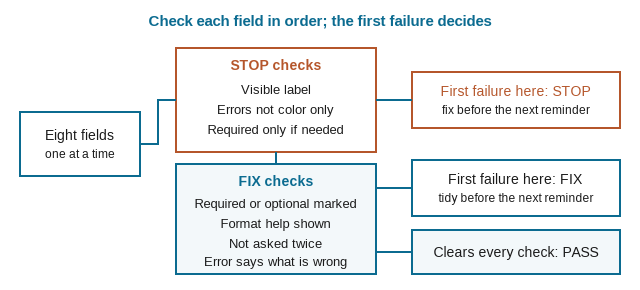
The lab’s STOP and FIX levels are teaching choices, too. WCAG doesn’t rank failures that way. Here, no label, color-only errors and required-but-not-needed are STOP; the rest are FIX.
Check your work
The first rule that matches sets the verdict. The baseline has every field labeled, marked, needed, with format help, filled in from earlier answers and with errors described.
- A, clean form: 0 STOP · 0 FIX · 8 PASS.
- B, placeholder labels: work email uses a placeholder only and CAGE code has no label: 2 STOP · 0 FIX · 6 PASS.
- C, confirm-email box: confirm work email isn’t filled in: 0 STOP · 1 FIX · 7 PASS. Tick “Re-entry is essential or for security” and it passes, because of the exception.
- D, required but not needed: citizenship required though the event doesn’t need it, and dietary needs not marked: 1 STOP · 1 FIX · 6 PASS.
- E, first-match order: CAGE code has a placeholder only, no format help and generic errors, and work email shows errors by color only: 2 STOP · 0 FIX · 6 PASS. CAGE code stops on the label alone; fix the label and it moves to FIX for format help.
- F, three tidy-ups: generic error text on work email, full name not marked, no format help on CAGE code: 0 STOP · 3 FIX · 5 PASS.
Common mistakes
- Treating placeholder text as a label.
- Relying on a red border alone to show an error.
- Asking again for something the form already has.
- Writing the CAGE code example from memory instead of checking your own records.
- Requiring citizenship from everyone when the event needs it only for its restricted session.
Limits
Passing these checks isn’t a full WCAG conformance review, and this tutorial doesn’t cover Section 508 or other legal requirements. It also doesn’t cover what a citizenship question must ask or how answers are handled; that belongs to your security and compliance staff. WCAG text is as published on W3C’s site on November 1, 2026.
Next
For the budget side, read before you pay for a defense directory listing. For the push itself, see plan a registration push your team can run.