

Tutorial
Close a Registration Gap in Four Weeks Without Promising What Isn't Confirmed
A small defense or space marketing team has four weeks and three hours a week to close a registration gap for its own technical day. Let AI draft the plan, invitations and reminder, then check that every line matches the fact sheet, links say where they go, and the weekly review never credits a channel it can't prove.
Time needed: About 45 minutes
Before you start:
- The event's fact sheet: date, prices, registration target and the approved registration link
- A current registration total from your registration platform
- An events lead who approves the plan and every outgoing line
Events Conferences Measurement Defense Space
By the end of this guide you’ll have an approved four-week time plan, two invitations, a landing block, a reminder and a weekly review row, each one checked against the event’s fact sheet before anything goes out.
AI can draft all of that in minutes. It also drafts confidently: “only a few seats left,” a keynote name from last year, a quote from “a program manager” who never said it. The work here is keeping the draft honest. The pocket question for every line: is this something we can already stand behind?
Illustrative example: “Tamsin Ridge Avionics,” its “Open Systems Technical Day” on December 10, 2026, and every number below are invented for teaching.
Step 1: Start from what you know and what you don’t
Tamsin Ridge wants 150 registrations and has 96. The gap is 54 registrations. It is not 54 seats: the venue hasn’t approved a capacity, so nobody knows how many seats exist. Speakers haven’t confirmed either.
Write the fact sheet before you prompt anything: date, industry price (USD 75), small-business partner price (USD 50), target, baseline and the approved registration link. Mark what is still unknown. Hand the AI tool the fact sheet, not your memory of last year’s event.
Step 2: Fit the work into 180 minutes a week
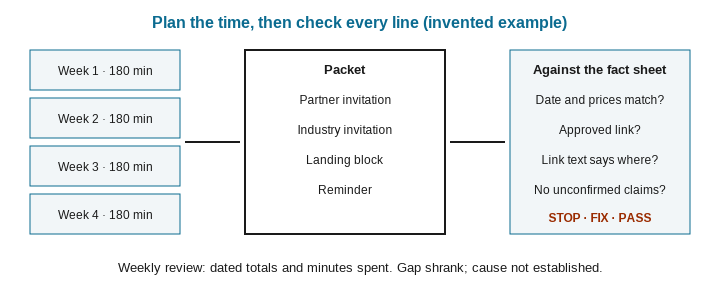
The team has three staff hours a week for four weeks, 720 minutes in all. Ask the AI tool for a plan that fits inside that ceiling, then treat each block as proposed work until your events lead signs off.
| Week | Main work | Minutes |
|---|---|---|
| 1 | Fact sheet, partner invitation, landing block | 180 |
| 2 | Industry invitation, first review | 180 |
| 3 | Reminder, partner follow-up | 180 |
| 4 | Final reminder, last review | 180 |
A plan under 180 minutes is fine; the number is a ceiling, not a target. That’s our teaching choice.
Step 3: Draft an invitation for each audience
Draft one invitation for small-business partners and one for industry attendees. Each says what the day covers, who it’s for, the date, the right price and the approved link.
Three things stay out until they are true: a scarcity line while capacity is unapproved, a named speaker before that speaker confirms, and any testimonial. Nobody has attended this year’s event yet, so nobody has a quote. If government staff may attend, your ethics or contracts office sets the rules for government attendees.
Try it now: the registration push check opens an invented company’s four-week packet for its technical day. Change the minutes, prices, links and claims, and it marks every line STOP, FIX or PASS against the fact sheet. It sends nothing and publishes nothing.
Step 4: Keep the landing block and reminder telling the same story
Drafts drift. The email says USD 75 and the landing block says USD 70; the reminder points to a placeholder link someone meant to replace. Compare every asset with the fact sheet, field by field, before the events lead sees the packet.
Then read the link text. WCAG 2.2’s success criterion on link purpose says: “The purpose of each link can be determined from the link text alone or from the link text together with its programmatically determined link context”. W3C’s explanation adds: “Whenever possible, provide link text that identifies the purpose of the link without needing additional context.” “Register for the Open Systems Technical Day” passes that test. “Click here” doesn’t.
This is one narrow check, not an accessibility audit. The W3C page is marked “Informative explanations, not required to meet WCAG,” and the list of vague phrases the lab flags is our own.
Step 5: Review weekly like you’ll have to explain it
Once a week, write down dated totals: registrations to date, the actions actually delivered and the minutes actually spent. If registrations rose from 96 to 104 after the partner email went out, write “Gap now 46 registrations. Cause not established.” The lab puts it plainly: “A smaller gap alone doesn’t prove which channel caused it.”
Step 6: Check your work
- Compare each asset’s date, prices and link with the fact sheet.
- Delete any scarcity line, unconfirmed speaker name or testimonial.
- Confirm each week’s minutes are within 180 and approved.
- Run Tamsin Ridge’s six invented cases through the lab. You should get:
- A, clean packet: all nine lines PASS; planned minutes 720 of 720.
- B, scarcity claim: the reminder is STOP. Tick “Venue capacity approved” and it passes.
- C, borrowed speaker: the industry invitation is STOP: “No named speaker until the speaker confirms.”
- D, drifting price: the landing block is FIX for the industry price, not the placeholder link. Fix the price and the placeholder FIX appears.
- E, over budget and vague link: two FIX lines, week 2 at 210 minutes and the reminder’s “click here”; planned minutes 750 of 720.
- F, channel credit: the review is STOP and week 4 is FIX: “Still a proposal. The events lead hasn’t approved it.”
Mistakes that feel like progress
- Scarcity copy. The lab says “No scarcity claim.” until capacity is approved.
- A borrowed speaker. Last year’s keynote is not this year’s.
- Channel credit. One week’s rise doesn’t belong to the email that went out that week.
- Reading motives into attendee records. In our practice, a registration says someone signed up. It doesn’t say why, and guessing invites mistakes.