

Tutorial
Check the Calendar File and Every Clock on a Defense Invitation
For events, marketing and business development staff at large defense and space primes: open one invitation's calendar file in an approved text editor, line up the email text, the start line and the registration page, list every place the audience will join from, and fix anything the answers flag before the invite goes out.
Time needed: About 40 minutes to check one invitation; fixing the calendar file and the registration page may take longer
Before you start:
- One invitation you are about to send, with its calendar attachment and registration page
- A plain text editor already approved on your work computer
- The list of places your audience will join from
Events Invitations Calendar Time Zones Ics Webinars Defense Space
Who this is for: events, marketing and business development people who send webinars, industry day sessions and show meetings to program office staff, service members, allied partners and suppliers, and who work at a large prime in defense or space. Invitations go out through company email and calendar systems. If the company allows AI at all, it stays on an account IT runs, and odd attachments go to quarantine. Readers at a small firm will find a labeled box later in this walkthrough.
General information only: not legal, security or compliance advice. Your event owner, your communications team and IT decide what an invitation says and which calendar systems send it.
Teaching example: Invented Kestromar Aerospace and the eight sample invitations in the lab are made up. No real prime, program office, base, unit or show is named, and no calendar or webinar product is named either.
One invitation, three faces
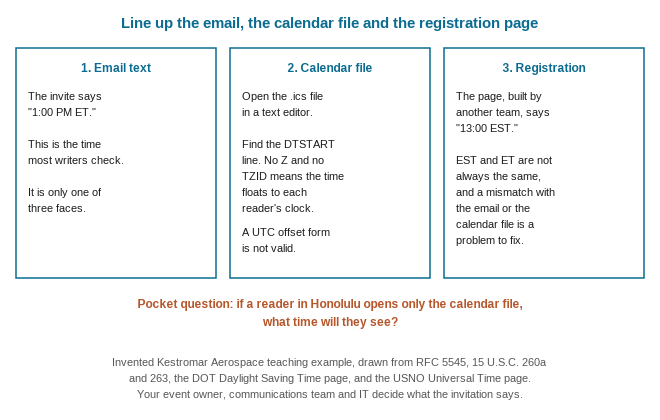
The capability webinar for program office staff at Invented Kestromar Aerospace is set for 1 p.m. Eastern on a Tuesday in early March. The invitation text says “1:00 PM ET.” The registration page, built by a different team, says 13:00 EST. The calendar attachment was exported from a scheduling tool that wrote the start with no time zone at all. Attendees in Hawaii add it to their calendars and see 1 p.m. their time. A partner office in Guam sees Tuesday when, for them, it is already Wednesday. A service member asks for the Z time and nobody on the events team is sure what it is. The session falls six days before U.S. clocks change, and the follow-up reminder will go out after they have.
A defense invitation is three things at once: the email text, a calendar file and a registration page. The audience is spread across places with unusual clocks: program office staff in Hawaii, an audience in Guam, a show in Arizona, service members who read times in Z, allied partners overseas. The calendar file is the part nobody reads, and it is the one most people actually use. The question to keep in your pocket: if a reader in Honolulu opens only the calendar file, what time will they see?
This tutorial is a read-only check in tools IT already approved. Open the calendar file in a plain text editor. Do not upload the file, and do not paste it into an AI tool. Keep sensitive marketing work on the machine is the broader case for staying in approved local tools. Who should be on the invite at all is a separate check, in check the send list before the invite.
The steps
-
Line up the three faces. Copy the time from the invitation text, the calendar file and the registration page onto one line each. No AI tool and no upload: this is a read-only check in tools IT already approved. Our reading: if those three faces disagree, readers believe whichever one they open first. In the lab that reading is VERIFY R4, labeled “(Our rule)”.
-
Read the calendar file’s start line. Open the .ics attachment in a plain text editor and find the line that begins DTSTART. RFC 5545, the Internet Calendaring and Scheduling Core Object Specification (iCalendar), is an IETF Standards Track document from September 2009. It is a technical standard for calendar data, not a statute and not a company policy on invitations. It describes three forms of date and time.
A time ending in Z is UTC. The standard says the date with UTC time “is identified by a LATIN CAPITAL LETTER Z suffix character, the UTC designator, appended to the time value.” A time with TZID= names a time zone. A local time with neither is floating. The standard says “DATE-TIME values of this type are said to be ‘floating’ and are not bound to any time zone in particular.” It also says floating values “are used to represent the same hour, minute, and second value regardless of which time zone is currently being observed,” so, in the standard’s own words, the recipient “SHOULD interpret the value as being fixed to whatever time zone the ‘ATTENDEE’ is in at any given moment.” In the standard’s words, two “Attendees”, in different time zones, receiving the same event definition as a floating time, “may be participating in the event at different actual times.” And: “Floating time SHOULD only be used where that is the reasonable behavior.”
For a fixed time, the standard says “To properly communicate a fixed time in a property value, either UTC time or local time with time zone reference MUST be specified.” It also says “The form of date and time with UTC offset MUST NOT be used,” and introduces an example as “the following is not valid for a DATE-TIME value.”
STOP R1: when the calendar start is floating, the invitation is set to Send, and the audience covers more than one time zone, the lab’s message is: “The calendar file uses floating time, which RFC 5545 says is the same hour in every time zone, so attendees in other time zones see a different time; fix it before send.” That is a check to run before send, not a law and not a “rule” in the legal sense. If the same floating start is on hold with more than one zone, R1 does not fire and VERIFY R5 does. If everyone on the invite is in one time zone, a floating start does not trip R1 and is PASS unless another check applies on its own.
STOP R2: when the calendar start uses a UTC offset form and the invitation is set to Send, the lab’s message is: “The calendar file breaks the iCalendar standard (RFC 5545); fix it before send.” That wording is backed by the standard’s “MUST NOT be used” sentence and by its “not valid” example. Call this a check or a stop, never a rule of law.
If the calendar start is floating or in the offset form, and the invitation is still on hold, the lab raises VERIFY R5 (pinned to the standard, not labeled “(Our rule)”). VERIFY R3, labeled “(Our rule)”, fires when any answer is blank or unlisted. Other checks the lab added in our voice also carry that same “(Our rule)” label.
-
Add a Z line for DoD audiences. The U.S. Naval Observatory’s Universal Time page (an official U.S. Navy site, accessed November 16, 2026) explains: “Sometimes a Z is appended to a time to indicate UT, as in 0935Z.” It also says “Times given in UT are almost always given in terms of a 24-hour clock,” that “UTC is the basis for civil standard time in the U.S. and its territories,” and that “Standard time within U.S. time zones is an integral number of hours offset from UTC.” On Greenwich Mean Time, the same page says the term “has been used in several ways” and “its use is no longer recommended in technical contexts.” Our reading: give the Z time beside the host time, work it out from the session date with an approved tool, and do not label times GMT. In the lab those readings appear as VERIFY R6 and VERIFY R12, both labeled “(Our rule)”. R12 is our practice, not a finding that GMT is wrong on an invitation.
-
List the places that keep one clock all year. The Department of Transportation’s Daylight Saving Time page (last updated September 3, 2025) says “Daylight Saving Time is not observed in Hawaii, American Samoa, Guam, Northern Mariana Islands, Puerto Rico, the Virgin Islands, and most of Arizona.” It also says “If a State chooses to observe Daylight Saving Time, it must begin and end on federally mandated dates.” 15 U.S.C. 263 (United States Code, 2023 Edition) names the U.S. zones, including that “that of the second zone shall be known and designated as eastern standard time,” “that of the eighth zone shall be known and designated as Samoa standard time,” and “that of the ninth zone shall be known as Chamorro standard time.” Our reading: any audience in the places that do not observe daylight saving time gets its own line with its own clock time. In the lab that reading is VERIFY R8, labeled “(Our rule)”.
-
Check the clock change window. Under 15 U.S.C. 260a (United States Code, 2023 Edition), “During the period commencing at 2 o’clock antemeridian on the second Sunday of March of each year and ending at 2 o’clock antemeridian on the first Sunday of November of each year,” the standard time of each zone “shall be advanced one hour.” Our reading: an invitation written before a change for a session after it is the one to recheck. In the lab that reading is VERIFY R10, labeled “(Our rule)”; the 14-day window is our choice, not a figure from the Code.
-
Keep the start out of the skipped or repeated hour. RFC 5545 says that if the local time described occurs more than once (when changing from daylight to standard time), “the DATE-TIME value refers to the first occurrence of the referenced time.” If the local time does not occur (when changing from standard to daylight time), “the DATE-TIME value is interpreted using the UTC offset before the gap in local times.” Our reading: calendars may not show the hour you meant; move the session. In the lab that is VERIFY R7, pinned to those sentences, not labeled “(Our rule)”.
-
Check the date, and anyone overseas. For some audiences the session falls on a different calendar date; print their date next to their time. In the lab that reading is VERIFY R9, labeled “(Our rule)”. The sources here cover U.S. clocks only. For an audience outside the United States, check that country’s own official clock rules for the session date, or give a Z line they can convert. Do not rely on a remembered overseas change date. In the lab that general check is VERIFY R11, labeled “(Our rule)”, with no foreign source and no foreign dates printed here. Two further lab checks in our voice, both labeled “(Our rule)”, are VERIFY R13 (the invitation states no time zone) and VERIFY R14 (the three faces have not been compared yet).
-
Run the lab, then fix and recheck. Fix the invitation, the calendar file and the registration page, never just one of them, and run the same questions again. A start with no Z and no time zone is a different time for every reader. Give the Z time, and work it out from the session date. Fix all three faces of the invitation, then check them again.
Try it now: open the defense invite time check lab and load Case B. Watch Invite 1, the capability webinar, whose calendar start is floating, the audience joins from more than one time zone, and the action is Send: STOP R1 fires first, and VERIFY R8 is listed with it. Then load Case D: Invite 1, a floating start with a one-zone audience, passes; Invite 8, floating and on hold with more than one zone, is VERIFY R5. Load Case C and watch Invite 4, whose start uses a UTC offset form and is set to Send: STOP R2 fires first, and VERIFY R11 is listed with it.
The worked example
Invented Kestromar Aerospace. Invite 1, the capability webinar, has a calendar file whose start has no Z and no TZID, the audience joins from more than one time zone and includes Hawaii but the text lists only Eastern time, and it is about to be sent. Two checks match: STOP R1 (floating calendar time, more than one zone, about to send) and VERIFY R8 (Our rule: places without daylight saving time, no line of their own). The sheet reports STOP R1 because it comes first, and names both matches. Invite 3, the small business outreach call, is within 14 days of a U.S. clock change and nobody rechecked the times: VERIFY R10. Invite 7, the hiring webinar, labels its time GMT: VERIFY R12. Case D shows the gate: Invite 1 with a floating start and a one-zone audience passes, and Invite 8, floating and on hold with more than one zone, is VERIFY R5.
Check the sheet against these totals
Each invitation gets a leading verdict, and every check that also matched is still named beside it. A STOP means repair the calendar file before send. A VERIFY means more work remains before any send. A PASS means none of the teaching checks fired, and that is not a clearance to send. The first match sets the leading verdict. The printed STOP, VERIFY and PASS totals, by case, are:
| Case | STOP | VERIFY | PASS |
|---|---|---|---|
| A, all clear | 0 | 0 | 8 |
| B, floating start | 1 | 2 | 5 |
| C, offset start | 1 | 2 | 5 |
| D, hold and one zone | 0 | 3 | 5 |
| E, values as entered | 1 | 3 | 4 |
| F, mixed invites | 1 | 2 | 5 |
Five rows match more than one check: B Invite 1 (R1 and R8), C Invite 4 (R2 and R11), D Invite 5 (R4 and R6), E Invite 6 (R1 and R9), and F Invite 3 (R7 and R10).
The lab uses invented invitations and teaching checks. It is not legal, security or compliance advice, and a PASS is not a clearance to send. When more than one check matches a row, clear each of them, beginning with the first, before anyone sends that invitation. Run your own invitation the same way. The three faces agree. The calendar start is UTC or local time with a time zone reference. Places that do not observe daylight saving time have their own line. The Z time sits beside the host time and matches the session date. Anyone overseas has a checked clock rule or a Z line they can convert.
Common mistakes
- Trusting the email text alone. The calendar file is the invitation most people actually use.
- Leaving a start with no Z and no TZID, then hitting send, when the audience spans more than one time zone. Recipients elsewhere see the same clock numbers on a different local hour.
- Writing a UTC offset in the calendar file. The iCalendar standard says that form is not valid; fix the file before send.
- Fixing only one face. If you change the email, change the calendar file and the registration page too, then compare them again.
- Labeling the time GMT. Give a Z time instead, worked out from the session date.
- Skipping the clock-change window. An invitation written before a U.S. change for a session after it is the one to recheck.
Small contractors and startups. No events team? One person owns the invitation. Open the calendar file in an approved text editor, line up the three faces, list every place the audience will join from, and write a Z time next to the host time. Make it company policy that the calendar file and the attendee list never go into an AI tool, even an approved one; this check stays in the approved editor.
Related
Related reading: check the send list before the invite and keep sensitive marketing work on the machine.
Limits
These sources are one IETF calendar standard, two sections of the United States Code (2023 Edition), one Department of Transportation page and one U.S. Naval Observatory page accessed November 16, 2026. They cover U.S. clocks and the format of a calendar file. None measures how often defense invitations or calendar files carry the wrong time, so this tutorial prints no such figure. A PASS in the lab is not an events decision. Your event owner, your communications team and IT decide what the invitation says and which calendar systems send it.
Sources
- B. Desruisseaux, Ed., "Internet Calendaring and Scheduling Core Object Specification (iCalendar)," RFC 5545, IETF, Standards Track, September 2009
- 15 U.S.C. 260a, "Advancement of time or changeover dates," United States Code, 2023 Edition
- 15 U.S.C. 263, "Designation of zone standard times," United States Code, 2023 Edition
- U.S. Department of Transportation, "Daylight Saving Time" (regulations page), last updated September 3, 2025
- U.S. Naval Observatory, Astronomical Applications Department, "Universal Time" (FAQ page; accessed November 16, 2026)
- Adapted from AssociationAI, "Check Webinar Start Times in Every Audience Time Zone Before the Invitations Go Out"