

Tutorial
Hotel, Venue or Company Network? Check Each Device's Address Setting Before the Trip
For events leads at large defense and space primes: before a show, check that each company-managed device's Wi-Fi address setting fits the networks on the trip plan, using an IETF informational document, and hand every mismatch to IT or security.
Time needed: About 20 minutes
Before you start:
- Your company's travel and device policy, as set by IT and security
- The trip plan, with the hotel, venue and office networks your team will join
- The list of company-managed devices going on the trip
ADSEC Opsec Mobile Travel Events Defense Space
Who this is for: the events or marketing lead at a large defense or space prime who travels to shows with company-managed laptops and phones. Your IT and security teams have already set the device and travel policy. It isn’t written for a contractor without a policy. Every STOP and FIX goes to IT or security; you don’t change device settings yourself.
The company, devices and networks in the lab are invented.
The source
This routine rests on RFC 9797, an IETF informational document published in June 2025. In its own words, “This document is not an Internet Standards Track specification; it is published for informational purposes.” It doesn’t name a lay audience; our reading is that it was written for people who build and run networks.
Why a device’s address matters
Every Wi-Fi device sends a hardware address over the air. The RFC explains the concern plainly: “Wi-Fi is an over-the-air medium that allows attackers with surveillance equipment to monitor WLAN packets and track the activity of WLAN devices.”
Changing that address helps, with a condition. With a randomized address, the RFC says, “it becomes harder to use the MAC address to construct a persistent association between a flow of data packets and a device, assuming no other visible unique identifiers or stable patterns are in use.” Its summary adds the limit: “devices may continue using other stable identifiers, defeating the purpose of MAC address randomization.”
Not every network is the same
The RFC sorts networks by how much the network and the device trust each other. Two kinds matter on a trip.
Guest networks. “Public hotspots in shopping malls, hotels, stores, train stations, and airports are typical examples of this environment.” The RFC doesn’t list trade-show halls; treating show Wi-Fi as a public guest network is our reading. For these networks it says, “Devices in this network should avoid using a long-lived MAC address to prevent fingerprinting.” It gives an example: “the device may use a different MAC address every time it attaches to a new Wi-Fi access point.”
Company networks. When the network and the devices are both “owned and managed by the enterprise” the RFC calls the trust level “Full trust” there. On these networks a changing address can cause trouble: “Changing the MAC address may interrupt network services if the services are based on that MAC address.” The RFC states that line for employee-owned devices on a company network and treats company-owned devices the same way; applying it to your company-managed laptop is our reading.
Two more points matter. Some devices can “manifest a different MAC address in different SSIDs,” so one setting can mean a new address for each network. And a changing address doesn’t cover everything: the RFC says it is “not intended to protect from the exposure of other identifiers to the venue network (e.g., DHCP option 012 [host name] visible to the network between the AP and the DHCPv4 server).” Our reading: a device name that shows a person or the company is one of those identifiers.
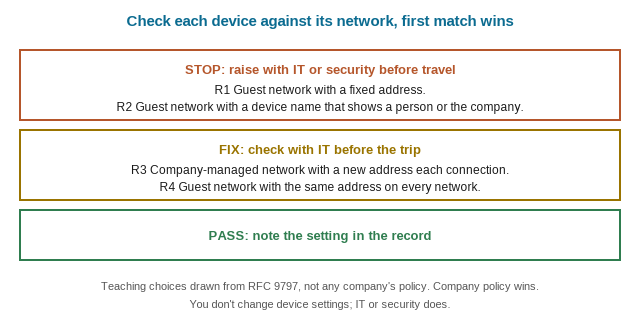
The check
The steps, their order and the STOP and FIX levels are teaching choices drawn from RFC 9797, not any company’s policy. Where your company’s policy differs, your company’s policy wins.
- Open the policy. Pull up the travel and device policy.
- List the networks. Write down each network on the trip plan and its kind: public guest (hotel, venue), company-managed, employee-device (BYOD) or home.
- List the devices. Note each company-managed device going on the trip.
- Record what IT set. Note each device’s address setting and whether its name shows a person or the company. Read it; don’t change it.
- Sort each device. The first rule that fits decides:
- STOP: a guest network with a fixed address.
- STOP: a guest network with a device name that shows a person or the company.
- FIX: a company network with a new address on every connection.
- FIX: a guest network with the same address on every network.
- PASS: anything else.
- Hand it off. Raise every STOP and FIX with IT or security before the trip, and keep the dated record.
Try it now: open the venue network address check, load Case C, and work out why Device 1 stops on the name rule even though its address setting also needs a fix.
Check your work
| Case | STOP | FIX | PASS |
|---|---|---|---|
| A | 0 | 0 | 6 |
| B | 1 | 2 | 3 |
| C | 3 | 0 | 3 |
| D | 1 | 2 | 3 |
| E | 1 | 3 | 2 |
| F | 2 | 2 | 2 |
Four devices across the cases fit more than one rule; in each, the rule listed first sets the verdict.
Common mistakes
- Changing a setting yourself. Raise it with IT or security instead.
- Treating show Wi-Fi as a company network. In this check it’s a public guest network.
- Checking the address but not the name. A name that shows a person or the company is a STOP on a guest network.
- Reading PASS as a security clearance. It only means no lab rule matched.
Related
See our look-alike network post, our post on Wi-Fi people counting and what address randomization does and doesn’t hide.
Limits
RFC 9797 is an IETF informational document, and it doesn’t measure risk at trade shows. The rules and their order are teaching choices. Your company’s policy always comes first.