

Tutorial
Count Briefing-Room Traffic at a Show With Aggregate Wi-Fi Sensing
Wi-Fi sensing can count people crossing a doorway without reading anyone's phone. Here is how a defense or space marketing team sets up direction, sampling windows and a clicker check, derives occupancy and dwell from aggregate counts, and writes down what the numbers can and can't claim.
Time needed: 45 to 60 minutes before the show, plus a 15-minute clicker check on the day
Before you start:
- A briefing room with one main doorway and venue permission to place equipment
- A doorway sensing setup that reports aggregate crossings, not device identifiers
- One staffer with a hand clicker for a 15-minute check
Measurement Events Trade Shows Privacy Defense Space
By the end of this guide you’ll have a doorway count for one briefing room in 15-minute windows, an occupancy and dwell estimate built only from those totals, and a short note saying what the numbers can and can’t claim.
This is not the hall survey from listen to the show hall Wi-Fi before doors open, which looks for look-alike networks. Here the radio is a measuring tape. The IEEE 802.11bf task group defines Wi-Fi sensing as “the use of PHY and MAC features of IEEE 802.11 stations to obtain measurements that may be useful to estimate features of objects in an area of interest.” A body in a doorway disturbs the signal between a transmitter and a receiver, so nobody’s phone is read.
Keep expectations honest. A UC Santa Barbara team counted a seated crowd with the estimate “zero or one person off from the true number of people 96.3% of the time” in its non-through-wall tests. The Sensors study of doorway counting describes its own method as “at the laboratory research stage and is not ready for real use yet.” Treat sensing as one input you check against a person with a clicker.
Illustrative example: “Lanternfish Orbital, Inc.,” the “Wrenfield Space Symposium” and every count below are invented for teaching.
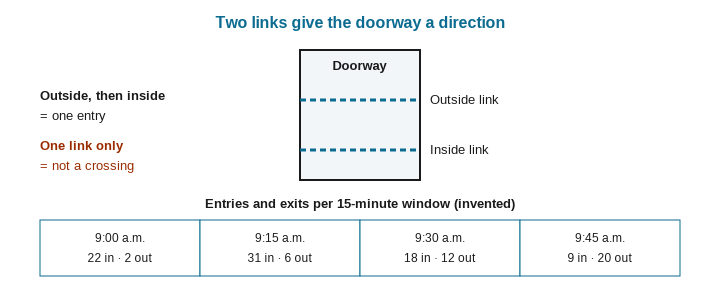
Step 1: Give the doorway a direction
Place two sensing links across the doorway, one just outside and one just inside. Outside then inside is an entry; inside then outside is an exit. Set a short pairing time so a person walking through counts once.
A lone trigger on one receiver is not a crossing. Leave it out of the count. It is usually someone pausing at the door to read the agenda.
Step 2: Pick the sampling window first
Decide the window before the show: 15 minutes suits most briefings. Lanternfish’s room from 9:00 to 11:00 a.m. logged 129 entries and 129 exits across eight windows.
An hourly snapshot can miss the peak. Report peak occupancy from 15-minute windows. At Lanternfish, the room peaked at 58 people at 10:15 a.m., but the 10:00 a.m. hourly reading showed 40.
Step 3: Check the busiest window with a clicker
Bunching is the main source of error: two people shoulder to shoulder can look like one. In the Sensors study’s small office, accuracy in counting a group passing the door together was 98% for one or two people but 75% for five, and recognition dropped to 88% when someone else was moving in the room.
Put one named staffer with a hand clicker at the door for your busiest 15 minutes. Lanternfish’s clicker counted 36 entries at 9:15 a.m. where the sensor counted 31. Report that as a known undercount at rush times. Don’t quietly multiply every window by it.
Try it now: the doorway crossing counter gives you an invented briefing room’s crossings. Change the window, the lone triggers and the claims in the report, and it shows the occupancy, dwell and what to fix first.
Step 4: Derive occupancy and dwell from totals
Work from the window totals only:
- Occupancy at the end of each window is entries so far minus exits so far.
- Person-minutes are the average occupancy in each window times its length, added up. Lanternfish’s came to 4,290.
- Estimated average stay is person-minutes divided by entries: about 33 minutes.
That figure describes the room, not any one visitor. It holds up only if the room starts and ends empty and every exit goes through the counted door.
Step 5: Don’t dedupe by device
The temptation is to turn crossings into unique visitors by tracking phones. Skip it. Phones change their Wi-Fi addresses on purpose: the arXiv study describes MAC address randomization as a way “to protect the privacy of users and prevent device tracking.” Getting past that means tracking people, which this method exists to avoid.
A crossing count is not a headcount of people. The same person walking in twice is two entries. Say so in the report.
Step 6: Write what the count can claim
Post a plain notice at the door saying the room counts crossings with radio sensing and keeps no device or personal data. Then write the report note:
- Can claim: entries and exits per window, estimated peak occupancy, estimated average stay, and the clicker check.
- Can’t claim: unique visitors, repeat visitors, who attended or which organizations came, or whether a visit led to a meeting.
If a sponsor wants proof that people stopped at their stand, proof of booth traffic at a defense show covers what an exhibitor can fairly ask for.
Adapted from an AssociationAI.ai how-to for marketing teams at defense and space shows. Lanternfish, Wrenfield and the counts are invented; no real sensor or venue network was used.
Sources
- UC Santa Barbara, "Don't Fidget! WiFi Will Count You" (2021)
- Tian et al., "A People-Counting and Speed-Estimation System Using Wi-Fi Signals" (Sensors 21(10), 3472, May 2021)
- IEEE 802.11 Task Group BF (WLAN Sensing), project status page
- "Probing for Passwords – Privacy Implications of SSIDs in Probe Requests" (arXiv 2206.03745v2)
- Adapted from AssociationAI.ai, "Count Foot Traffic at Your Event With WiFi Sensing"