

Tutorial
Before Doors Open: Listen to the Show Hall's Wi-Fi and Flag Look-Alike Networks
A permission-first routine for defense and space booth teams: walk the exhibit hall with a phone that only listens, compare the Wi-Fi network names you hear with the ones you expect, hand anything suspicious to venue IT, and brief your own staff before the first visitor arrives.
Time needed: Roughly an hour over two short walks, one the day before and one the morning of
Before you start:
- Written permission from the venue or show organizer for a passive Wi-Fi survey, plus the name and number of its IT contact
- A company phone or laptop, and a Wi-Fi scanning app, that your IT or security team has approved
- The exact network names you expect to see at the show, copied character for character from the organizer's exhibitor materials and your own booth plan
Trade Shows Conferences Opsec Campaign Security Defense Space
The day before a show opens, booth teams test the demo unit and the badge scanner. Few check the air. The Wi-Fi names around your booth are what visitors and your own staff see when they reach for a connection, and a network wearing a familiar name is an easy trap to set.
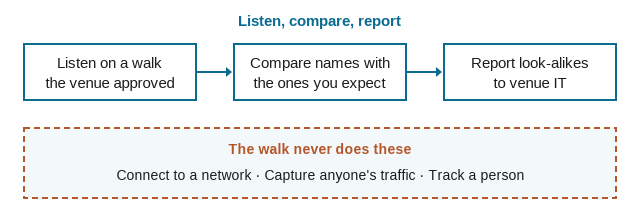
This routine is a short, permitted walk with a device that only listens. You note which networks are broadcasting, compare the names with the ones you expect, and pass anything odd to venue IT. You never connect, and you map networks, not people.
Illustrative example: the booth network name “KestrelRidge-Demo” is invented. No real show, venue or company is described.
Why a defense booth should care
NSA wrote its 2021 information sheet on wireless devices in public places for this industry, among others: “This infosheet gives National Security System (NSS), Department of Defense (DoD), and Defense Industrial Base (DIB) users the best practices for securing devices when conducting business in public settings.” It warns that “it can be difficult to ensure public networks (e.g., conference or hotel Wi-Fi®) are secure,” and that attackers “employ malicious access points” among other techniques. It describes the evil twin: a fake access point that mimics the public Wi-Fi people expect nearby.
A recent press report shows the trick in action. Tech Digest reported in August 2026 that passengers on a Delta flight spotted an unauthorized network called “Delta WiFi Fast,” prompting a federal investigation. Delta said its core systems and official in-flight Wi-Fi “were never hacked or compromised.” Per the report, “cabin crew disabled the aircraft’s Wi-Fi functionality for approximately 30 minutes while the rogue signal was active.” That is one press account, not an official finding.
The routine
-
Get permission in writing. Email the venue or organizer something like: “Before opening, we’d like to walk the hall with a phone that passively lists Wi-Fi network names and signal strength. We will not connect to any network or record anyone’s traffic.” Get the IT contact’s name and number, and tell your security officer. If the venue says no, there is no walk.
-
Set up one approved device. Use the device your IT team cleared, with Wi-Fi scanning and location on. If the app belongs to a community mapping project such as WiGLE (“All the networks. Found by Everyone.”), remember it exists to build a public map: keep your venue log on the device. Write your expected network names exactly, capitals included.
-
Walk the hall the day before. At visitor pace, cover registration, the lobby, the aisles around your booth and your meeting rooms. Allow most of an hour (our estimate, not a sourced figure).
-
Read the list for look-alikes. Flag copies of the show’s name or yours with something added, such as “KestrelRidge-Demo-Guest” or a year; names one character off; an expected name heard where the venue says it has no equipment; and open networks with official-sounding names. A scan shows what was heard and where, not who runs it.
Try it now: the look-alike checker simulates step 4 in your browser. Invented names appear on a mock walk of an invented hall; fixed rules flag copies, capital changes, one-letter swaps and look-alike characters against expected names you edit. It never scans or connects. If you said yes to site analytics, that tracker can still note pieces of fields you select and words you copy; otherwise nothing goes anywhere. A flag is something to report to venue IT, not a finding.
-
Walk again the morning of. Loop the entrance, lobby and your aisle once more: what appeared overnight?
-
Report, don’t investigate. Give venue IT the name, time and rough location, and copy your booth lead. Do not connect, hunt for the device or its owner, or try to knock it offline.
-
Brief the booth team. Turn the NSA sheet into a quick huddle: prefer a corporate hotspot with strong authentication and encryption over public Wi-Fi; turn off Wi-Fi autoconnect; confirm you are joining the correct network; if public Wi-Fi is unavoidable, use the corporate VPN, as NSA strongly advises; and “Forget” the network afterward.
-
Close it out. File a short note of findings and venue IT’s response, then delete the raw log under your retention policy.
Where the legal line sits
With permission, listening to broadcast names is the whole job. Two things sit clearly outside it.
Connecting without authorization. The federal computer crime statute, 18 U.S.C. 1030, reaches anyone who “intentionally accesses a computer without authorization or exceeds authorized access, and thereby obtains—” information. Treat every network you did not set up, open or not, as off limits.
Capturing what people send. In the Google Street View litigation, “plaintiffs alleged, on behalf of an estimated sixty million people, that Google illegally collected their Wi-Fi data through its Street View program.” The Ninth Circuit’s opinion explains that besides network names, the cars picked up emails, passwords and other content from unencrypted networks, and that Wiretap Act claims survived an early challenge. Those were allegations, and the case settled: “The settlement agreement provided that Google would establish a $13 million settlement fund.”
This is general information about U.S. federal law, not legal advice; venue policy comes first, and shows abroad have their own rules.
Check your result
- Every name you expected shows up in the log. If one is missing, ask venue IT why.
- Every flagged name has an answer from venue IT before doors open.
- The raw log exists only on the approved device, until you delete it.
Common mistakes
- Following a signal to a person. The walk maps networks, never attendees.
- Skipping the morning loop. Overnight changes are the point.
A listen-only booth routine drawn from NSA guidance, one press report and published court and statute text. The venue’s rules and your security officer’s direction override anything here.
Sources
- National Security Agency, Cybersecurity Information Sheet, "Securing Wireless Devices in Public Settings" (July 2021)
- Tech Digest, "Delta flight declares emergency after rogue Wi-Fi network appears onboard" (August 2026; press report)
- U.S. Court of Appeals for the Ninth Circuit, In re Google Inc. Street View Electronic Communications Litigation (December 27, 2021), FindLaw copy
- 18 U.S.C. 1030, Fraud and related activity in connection with computers (statute text)
- WiGLE, Wireless Geographic Logging Engine (community network-mapping project)
- Adapted from AssociationAI.ai, "Wardrive Your Venue Before Doors Open"