

Tutorial
Turn a Show-Lead Export Into an Ontology Without Moving the Data
For marketing and events staff at large defense and space primes: plan, column by column, how a trade-show lead export becomes a map of things, facts and relationships, check the plan in a lab with invented data, and leave the real rows in the approved CRM.
Time needed: About 45 minutes the first time
Before you start:
- Your CRM's lead export template: the column headers only, not the data
- Your company's rules for lead data and AI tools, as set by marketing operations, IT and security
- The name of whoever owns the CRM, so the finished plan has somewhere to go
Events Leads Crm Ontology Data Planning Defense Space
Who this is for: marketing and events staff at a big defense or space prime who come back from a show with a lead export and a request for “a map of who we met and what they care about.” At your company, lead data stays in the approved CRM, and AI is either off limits or available only through a company account. You can’t upload the sheet to a graph tool or a chatbot, and you shouldn’t. This tutorial plans the map on paper first, one column at a time, so the build can happen inside whatever system the company already approves. A labeled box near the end covers small contractors and startups.
The lab uses an invented export. Do not paste real lead data into it or into any AI tool.
Teaching example: Invented Dunmerrow Aerospace and its Sample export LEADS-0000 (invented) are made up. No real show, company, agency or person appears.
What an ontology plan is
A flat export is a list of columns. An ontology turns some of those columns into things a lead can be connected to (an organization, a show, a capability area) and keeps others as facts that describe one thing (a job title, a work email). Each connection gets a short name, such as “works for.” Some columns should never enter the map at all.
The question to ask of every column: is it a thing, a fact about a thing, or something that stays out?
The two sources, and how far they reach
Both sources come from biomedical ontology work, and we borrow them as habits, not rules for CRMs.
Schober and colleagues (BMC Bioinformatics, 2009; CC BY) write that “inconsistencies in naming conventions can impair the readability and navigability of ontology class hierarchies, and hinder their alignment and integration.” Their conventions grew from a survey of “the custodians of the 66 OBO ontologies (as of November 2007).” They are candid about scope: their conventions “do not necessarily apply to other domains,” and they say they “deliberately confined” themselves to the needs of the OBO Foundry community.
Smith and colleagues (Genome Biology, 2005; CC BY) looked at the links between terms. They found relations added “in informal ways, often providing no definitions at all, so that the logical interconnections between the various relations employed are unclear.” Their criteria ask for definitions written so meanings “will be clear to a human reader.”
The steps
The step order, the thing and fact split, and what counts as a problem are our teaching choices. Where your company’s data rules differ, follow them.
- Copy the headers, not the data. Open your CRM’s export template and write down each column header. No rows, no names, no email addresses.
- Take columns out first. Free-text notes and personal or security details (a personal phone, a personal email, a clearance level) come out of the plan before anything else. Notes can hold whatever someone typed at the booth. This is company-policy framing, not a finding from either paper.
- Mark each remaining column as a thing or a fact. A thing is something many leads can share and be linked to. A fact describes one thing and links to nothing.
- Name each kept column. Keep names “short and memorable, but precise enough to capture the intended meaning.” Schober and colleagues also advise: “Use singular names throughout.” Avoid “and” and “or” in a name. Avoid catch-all words, with “unknown” and “unclassified” among their examples. “Spell out abbreviations and acronyms and capture truncated versions as synonyms.” Keep status and version out of the name. A name “should have the same meaning on every occasion of use.”
- Name the relationship from the lead to each thing. Use a short verb phrase a new teammate would read the same way, such as “works for” or “met us at.” Loose phrases like “related to” or “has” say almost nothing.
- Write one sentence defining every kept column. That is the habit Smith and colleagues argue for, applied to a lead plan.
- Walk one invented row aloud. Smith and colleagues write that “it is only by means of a detour through instances” that rules for relations between classes can be stated clearly. Our reading: say “Sample lead A works for Organization B” through each relationship before trusting the plan.
Try it now: open the lead export ontology check lab, load Case C, and work out why Column 5 stops on the missing relationship even though its name also trips two naming checks.
- Hand the plan off. Fix every STOP, clear every VERIFY, and give the plan to whoever owns the CRM. The ontology gets built in the approved system, from the real data, by the people allowed to touch it.
Where AI fits
You can do all of this with no AI at all. If your company allows its approved AI account for this kind of work, it may see column headers and your definitions, never rows. No public chatbot, and no upload of the export.
The worked example
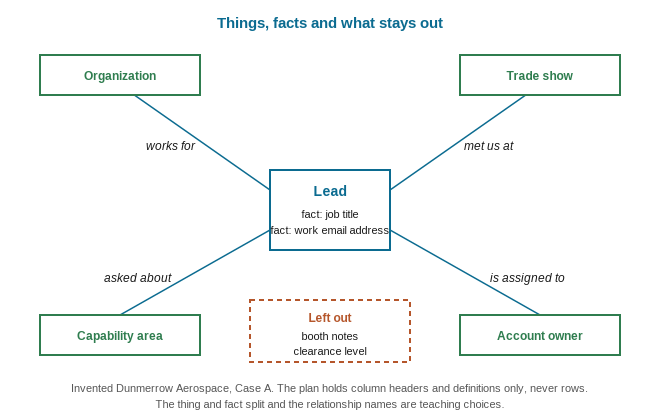
Invented Dunmerrow Aerospace, a mid-size space systems supplier, exports eight columns: company_name, job_title, work_email, show_name, capability_asked_about, followup_owner, booth_notes and clearance_level. Its finished plan, which is the lab’s Case A, looks like this:
| Column | Becomes | Name | Relationship from the lead |
|---|---|---|---|
| company_name | Thing | Organization | works for |
| job_title | Fact | job title | none |
| work_email | Fact | work email address | none |
| show_name | Thing | Trade show | met us at |
| capability_asked_about | Thing | Capability area | asked about |
| followup_owner | Thing | Account owner | is assigned to |
| booth_notes | Left out | none | none |
| clearance_level | Left out | none | none |
Check your work
In the lab, a STOP means the plan can’t go forward as written, a VERIFY means someone should look again, and a PASS means no lab rule fired.
- Case A: all eight columns pass.
- Case B: one stop, two verifies, five passes.
- Case C: two stops, two verifies, four passes.
- Case D: no stops, four verifies, four passes.
- Case E: two stops, one verify, five passes.
- Case F: one stop, two verifies, five passes.
In all six cases together, six columns match more than one rule; the first one in the list sets the verdict.
Common mistakes
- Mapping the notes column. It feels rich, but it can hold anything. Leave it out and let a person read notes in the approved system.
- Giving a fact a relationship. A job title doesn’t link to anything; it describes the lead.
- Plural thing names. Each node in the map is one organization, one show.
- Abbreviations only your team knows. Spell them out and keep the short form as a synonym.
- Treating PASS as approval. A pass means only that none of the lab’s rules fired. It is not approval to export or share anything.
Small contractors and startups. No CRM owner and no data team? The same plan works in a spreadsheet tab with four columns: header, becomes, name, relationship. Still leave notes and personal or security columns out, and keep rows out of any AI tool, whatever account you use.
Related
When the plan is done and the rows need cleaning, find duplicate and stale show leads works through the records themselves. For why release status sorts what may go into a company AI account, read your release review already answers most of the AI question.
Limits
Both papers describe biomedical ontologies. Schober and colleagues say one of their conventions “will not make sense in the domain of database schemata or object-oriented programming,” and we use their advice only as naming habits. The lab’s rules, their order and its word lists are our teaching choices, deliberately simple; it will misread some names. Your company’s data rules govern.
Sources
- Schober D, Smith B, Lewis SE, et al. "Survey-based naming conventions for use in OBO Foundry ontology development." BMC Bioinformatics 2009;10:125 (open access, CC BY 2.0)
- Smith B, Ceusters W, Klagges B, et al. "Relations in biomedical ontologies." Genome Biology 2005;6(5):R46 (open access, CC BY 2.0)
- Adapted from AssociationAI.ai, "Turn Your AMS Export Into an Ontology"