

Article
Who Else Can Watch a Camera Feed? Two FTC Cases, Read Carefully
For marketing and events staff at large defense and space primes: why your company treats every camera at a booth, office or hotel as a device on the inventory, read through what the FTC alleged in two camera cases.
ADSEC Opsec Devices Events Defense Space
Who this is for: people on the marketing and events side of a large defense or space prime who work near cameras in meeting rooms, at show booths, in home offices and in hotel suites used for customer meetings. Your IT and security teams have already set the device policy, and you follow it. This post explains the reasoning behind one part of that policy. It doesn’t ask you to buy, install or reconfigure anything, and it isn’t written for a contractor without a policy.
Most primes already hold a simple stance: any camera at a booth, an office or a hotel is a device on the inventory, and who can see its feed gets checked like any other access. A demo camera on a booth counter and a conferencing camera in a rented suite are on the same footing as a laptop. The useful habit is to stop thinking of a camera as a gadget and start thinking of it as an access list.
The two cases below show what that list can look like when nobody is watching it. They are examples of how access goes wrong. They aren’t a description of the equipment primes use, and nothing here describes any company’s own policy.
What these documents are
Both are complaints brought by the Federal Trade Commission. A complaint is the government’s side of a case. The Ring complaint opens with the line “Plaintiff, the Federal Trade Commission (“FTC”), for its Complaint alleges:” and the TRENDnet complaint says the Commission is “having reason to believe” that the company “has violated the Federal Trade Commission Act.” A complaint is not a finding, so every point below is what the FTC alleged, not what a court found.
The two documents also come from one agency pressing a similar theory about security promises. Read them as two cases from the same regulator, not as two independent confirmations of each other.
Inside access: who at the maker could watch
In its 2023 complaint against Ring, filed May 31, 2023, the FTC alleged that before September 2017, “Ring did not limit access to customers’ video data to employees who needed the access to perform their job function.” It went further. According to the complaint, every employee and hundreds of contractors had “full access to every customer video, regardless of whether the employee or contractor actually needed that access to perform his or her job function.”
The complaint also alleged the videos were “stored unencrypted on Ring’s network.” When one employee misused that access, the FTC alleged that “Ring failed to detect this inappropriate access through any technical means.” And looking back over the period before February 2019, the agency alleged that “Ring has no idea how many instances of inappropriate access to customers’ sensitive video data actually occurred.”
Set the names aside and the pattern is plain. The people who could watch a feed weren’t only the owner and whoever the owner chose. They included staff and outside workers at the company behind the service. The owner had no way to see that list, and, as alleged, the company couldn’t say how often it was used.
Outside access: sign-in that didn’t hold
The same complaint describes a second path. The FTC alleged that “between January 2019 and March 2020, more than 55,000 U.S. customers suffered from credential stuffing and brute force attacks that compromised Ring devices.” In plain terms, those are attempts to get into accounts with passwords reused from other sites or guessed in bulk. The complaint also alleged that a second sign-in step was offered but rarely switched on, and that “The bad actors disproportionately targeted indoor cameras.”
That figure covers U.S. customers in a fifteen-month window and Ring devices only, as the FTC described them. It isn’t a rate, and it says nothing about other products or other years. For how a company handles sign-in on accounts that matter, our post on marketing account sign-in policy covers that ground.
The TRENDnet case is the older example; we cite the FTC’s 2013 complaint. The cameras let users watch “live video and audio feeds (“live feeds”) from their cameras over the Internet,” and, quoting the company’s own marketing, were pitched for “babies at home, patients in the hospital, offices and banks, and more.”
The core allegation is a setting that said one thing and did another. According to the complaint, “the DVSA setting failed to honor a user’s choice to require login credentials and allowed all users’ live feeds to be publicly accessible.” The FTC also alleged the company “transmitted user login credentials in clear, readable text over the Internet” and had “failed to implement a process to actively monitor security vulnerability reports from third-party researchers, academics, or other members of the public.”
Two details matter for a workplace reader. The complaint lists, among the possible harms, exposure of “images and conversations from business properties.” And on how the problem came to light, it states: “Respondent learned of the breach on January 13, 2012, when a customer who had read about the breach contacted respondent’s technical support staff to report the issue.”
What the two cases share
This section is our reading, not a finding from either complaint.
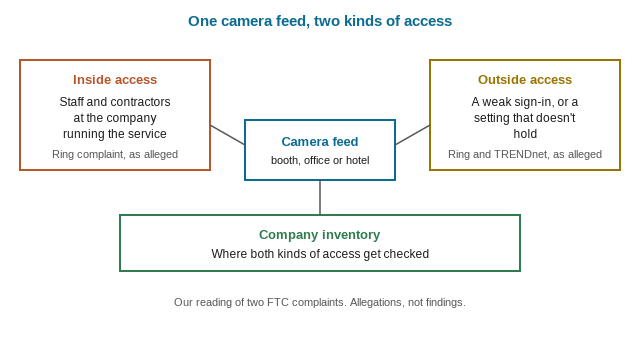
In both cases, as alleged, the person who owned the camera couldn’t see who else was watching. In one, the extra viewers were inside the company that ran the service. In the other, a setting that looked closed was open, and the company heard about it from a customer. Neither problem was visible from the camera itself.
That is why a prime’s device policy asks the same questions about a camera that it asks about any system with sensitive data. Is it on IT’s list? Who can watch, by name? Can it be reached from outside the company network, and who approved that? Is its software current? None of those answers can be read off the device on the booth counter. They come from IT’s records.
What a policy-following team does
This is our framing of how staff work within a policy that already exists. It isn’t legal advice and it isn’t any company’s policy.
- Use only cameras on IT’s approved list in meeting rooms, at booths and in suites booked for customer meetings.
- Don’t add a camera yourself. A personal device, a vendor’s demo camera or a venue’s built-in camera goes to IT or security before it’s switched on near company work.
- Ask before a feed goes anywhere new. If a vendor, agency or venue wants a camera feed sent to its own service, that’s an access request, and it goes to security.
- Report what you can’t explain. An unfamiliar account on a camera, a feed that seems reachable from outside, or a camera nobody can place goes to IT or security, not to the vendor.
- Keep a dated record before each show. Our camera access check walks through one, and the camera access check lab lets you practice on invented cameras first.
What these cases don’t tell you
They are two complaints, from 2013 and 2023, about two consumer products, and both are allegations. They don’t describe how any camera behaves today, and they don’t measure risk at trade shows or in corporate offices. The FTC’s case pages carry the full record, including how each matter was resolved.
The question they leave is a practical one. For any camera near your work, who besides your team could watch it, and would anyone notice? At a prime, the answer is supposed to live in IT’s inventory. Your part is to make sure every camera you work near is on it.