

Tutorial
Before the Show: A Four-Question Check for Your Team's Cameras
For events and marketing leads at large defense and space primes: keep a dated record of every camera your team works near, ask IT four questions about each, and hand anything off-list or unexplained to IT or security.
Time needed: About 25 minutes
Before you start:
- Your company's device policy, as set by IT and security
- A list of the cameras your team will work near: meeting rooms, booth demos, home offices, hotel suites
- A contact in IT or security who can answer questions about each camera
ADSEC Opsec Devices Events Defense Space
Who this is for: whoever runs events or marketing for a team at a big defense or space prime, when that team works near cameras: conferencing cameras in meeting rooms, a demo camera at the booth, a camera in a home office or a hotel suite booked for customer meetings. IT and security have already set the device policy. You record and hand off; you don’t configure. Every STOP and FIX goes to IT or security; you don’t change, unplug or remove a camera yourself.
The company and cameras in the lab are invented.
The source
This routine draws on NIST IR 8259A, a NIST report from May 2020. It isn’t a law or a rule for buyers. NIST says who it is for: “The main audience for this publication is IoT device manufacturers. This publication may also help IoT device customers or integrators.” Using NIST IR 8259A for a buyer-side record, as we do here, is our reading.
The report describes a baseline. In its words, “The core baseline’s role is as a default for minimally securable devices.” It also “does not specify how the device cybersecurity capabilities are to be achieved,” and it says, “It is left to the implementing organization to understand the unique risk context in which it operates and what is appropriate for its given circumstance.” At a prime, the implementing organization is IT and security.
Four capabilities, four questions
Identified. The baseline expects that “The IoT device can be uniquely identified logically and physically.” NIST explains why: “This capability supports asset management, which in turn supports vulnerability management, access management, data protection, and incident detection.” Our question: is this camera on IT’s list?
Access by authorized entities only. The baseline describes “The ability to logically restrict access to each network interface to only authorized entities (e.g., device authentication, user authentication)”. Our question: who can watch, by name? Treating a shared team login as weaker than named users is our reading.
Reach from outside. NIST warns that “unrestricted network access to an IoT device enables attackers to directly interact with the device, which significantly increases the likelihood of the device being compromised.” Our question: can it be reached from outside the company network, and did IT approve that?
Updates. The baseline includes “The ability to update the device’s software through remote (e.g., network download) and/or local means (e.g., removable media)”. Our question: is the software current, according to IT?
Two more capabilities belong to IT, not to this record: “The ability to restrict configuration changes to authorized entities only,” and state awareness, which NIST says “helps enable investigating compromises, identifying misuse, and troubleshooting certain operational problems.”
The steps
Everything below, from the order of the steps to which answers count as STOP or FIX, is a teaching choice we built from NIST IR 8259A. It isn’t any company’s policy, and if yours says something different, follow yours.
- Find the owner. Read your company’s device policy and note who in IT or security owns cameras.
- List the cameras. Write down each camera your team will work near, labeled Camera 1, Camera 2 and so on, with where it sits.
- Ask IT for four facts. For each camera: is it on IT’s inventory, who can watch, can it be reached from outside, and is its software current. Record IT’s answer, including “Unknown.”
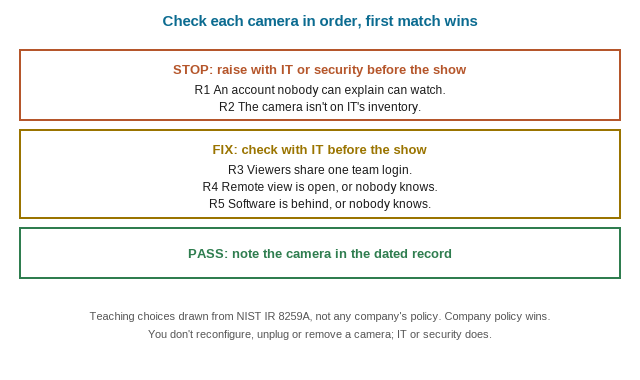
- Sort each camera. The first rule that fits decides:
- STOP: an account nobody can explain can watch.
- STOP: the camera isn’t on IT’s inventory.
- FIX: viewers share one team login.
- FIX: remote view is open, or nobody knows.
- FIX: the software is behind, or nobody knows.
- PASS: anything else.
Try it now: open the camera access check lab, load Case D, and work out why Camera 1 stops on the account rule even though it is also off the inventory.
- Hand it off. Raise every STOP and FIX with IT or security before the show. Don’t reconfigure, unplug or remove a camera yourself.
- Keep the dated record with the show file, and run it again before the next one.
Check your work
- Case A: all six cameras pass.
- Case B: Camera 1 stops, two cameras need a fix, three pass.
- Case C: two stops, one fix, three passes.
- Case D: one stop, three fixes, two passes.
- Case E: two of each verdict.
- Case F: three stops, one fix, two passes.
Seven cameras across the cases trip more than one rule. The earliest one decides.
Common mistakes
- Fixing it yourself. Changing a setting or unplugging a camera skips IT’s record. Raise it instead.
- Treating “Unknown” as fine. An unknown answer about remote view or software is a FIX until IT fills it in.
- Skipping the venue’s camera. A built-in camera in a rented suite belongs on the list too.
- Treating PASS as approval. A pass says only that none of the five lab rules fired.
Related
For why a prime’s policy treats a camera as an access list, read who else can watch a camera feed.
Limits
NIST IR 8259A dates from May 2020 and speaks mainly to device makers. It says nothing about risk at a show or in an office, and our rules are a classroom device. When they disagree with your company’s policy, the policy governs.