

Tutorial
Turn a Rule Change Into a Team Alert With Your Company's AI, Line by Line
For marketing and events leads at large defense and space primes: draft a six-line internal alert about a Federal Register document, trace every line to the official text, keep AI use inside your company-approved account, and hand the alert to contracts or legal before anyone reads it.
Time needed: About an hour the first time
Before you start:
- One Federal Register document that touches your team's work, opened from its FederalRegister.gov page
- Your company's AI policy, and its approved AI account if that policy allows one
- A named reviewer in contracts or legal who signs off on team alerts
Policy Regulation Ai Policy Federal Register Defense Space
Who this is for: the marketing or events lead at a large defense or space prime who has to tell the team about a new Federal Register document. At a company like that, contracts or legal reads the rule, and you may use AI only through the company-approved account, if at all. You draft; they approve. Small contractors and startups get their own box at the end.
This is general information, not legal advice.
Illustrative example: “Invented Velmarrow Systems” and its sample rule are invented. The document is labeled “Sample rule FR Doc. 0000-00000 (invented)” and stands for no real rule, agency or date.
The problem
A rule change shows up in a newsletter, someone pastes a summary into a chat thread, and by lunch the team believes a date the document never set, or treats a proposed rule as already in force. The fix is a habit: for every line in the alert, name the sentence of the official text that says it.
At Invented Velmarrow Systems, the events lead wants a six-line alert about the sample rule: document type, effective date, compliance date, one number, what changes for the team, and what the team does next.
Four things the sources settle
Which edition counts. FederalRegister.gov says plainly: “It is not an official legal edition of the Federal Register, and does not replace the official print version or the official electronic version on GPO’s govinfo.gov.” It also says “Each document posted on the site includes a link to the corresponding official PDF file on govinfo.gov.” The eCFR is in the same position: “The eCFR is not an official legal edition of the CFR.” It is, in its own words, “a continuously updated online version of the CFR”. Both help you find things; neither is the text you check against.
What kind of document it is. The Office of the Federal Register’s Document Drafting Handbook (August 2018 Edition, Rev. 2) describes the proposed rules category as “documents that propose changes to your agency’s regulations in the Code of Federal Regulations (CFR) and request public comment on those proposed changes.” The rules category “contains documents having general applicability and legal effect.” It also covers “Interim rule documents that are effective immediately and may request comments”.
Which dates exist. The handbook says “only rule category documents that amend the CFR have effective dates.” Separately, “Some rules include a compliance or applicability date in addition to an effective date.” Our reading: an alert that gives a proposed rule an effective date is wrong on its face.
Which part is the rule. The preamble “explains the basis and purpose of the regulatory text but contains no regulatory text.” Our reading: a line about what changes for the team should trace to the regulatory text, not only the preamble.
Where AI fits
Use your company-approved AI account only if your policy allows it, and paste in only the public text, never internal notes, customer names or bids. That is company-policy framing, not a source finding.
A defense customer’s own guidance shows why every AI line gets checked. The Army CIO’s generative AI memo of 27 June 2024, written for Army organizations, warns: “Gen AI tools are fallible and can produce “hallucinations” and biased results.” It defines the problem: “Hallucinations are a phenomenon whereby responses include or incorporate fabricated data that appears authentic.” And it tells its users they “should distrust and verify all outputs prior to use.” The same memo also says “Commands are discouraged from banning the use of Gen AI tools.” It is the Army’s internal guidance, not a rule for contractors, and it doesn’t show that any company bans AI.
The steps
We chose these rules and their order for teaching. They aren’t Federal Register or Army rules, and a PASS is not legal clearance.
- Open the official PDF. Follow the FederalRegister.gov page’s link to the PDF on govinfo. That is your text.
- Record the document type. Rule, interim rule or proposed rule, as the document itself says.
- Copy the dates. Note the effective date and any compliance date exactly as written, or that none is given.
- Draft six lines. Write them by hand or in your company-approved AI account, using only the public text.
- Trace every line. Record where each came from, whether you checked it word for word, and which AI account, if any, drafted it.
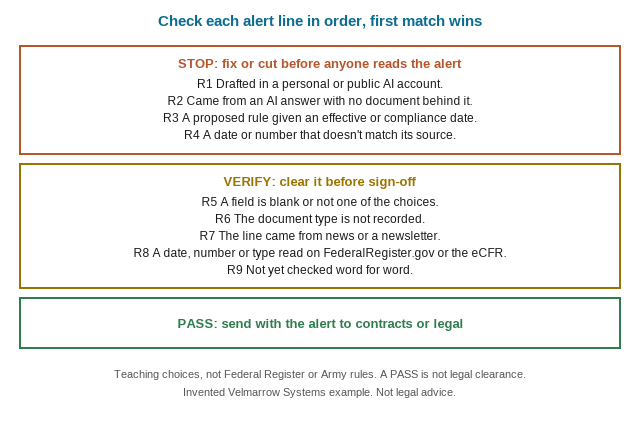
- Sort each line. The first rule that matches decides:
- STOP: drafted in a personal or public AI account.
- STOP: an AI answer with no document behind it.
- STOP: a proposed rule given an effective or compliance date.
- STOP: a date or number that doesn’t match its source.
- VERIFY: a field left blank or not one of the choices.
- VERIFY: the document type isn’t recorded.
- VERIFY: the line came from news or a newsletter.
- VERIFY: a date, number or document type read only on FederalRegister.gov or the eCFR.
- VERIFY: not yet checked word for word.
- PASS: anything else.
Try it now: open the rule alert line check lab, load Case B, and work out why Line 2 stops on the AI answer rule even though its date also fails the trace.
- Send it for sign-off. Fix every STOP, clear every VERIFY, and send the alert to your reviewer in contracts or legal. Log the date, document and approver.
- Watch for later documents. The handbook’s rules category includes documents that “Correct a previously published rule” or “Change the effective date”. If one appears, run the check again.
Check your work
- Case A: all six lines pass.
- Case B: STOP 1, VERIFY 2, PASS 3.
- Case C: STOP 3, VERIFY 0, PASS 3.
- Case D: STOP 1, VERIFY 3, PASS 2.
- Case E: STOP 1, VERIFY 2, PASS 3.
- Case F: STOP 1, VERIFY 3, PASS 2.
In the six cases, eleven lines trip two or three rules at once; only the first one counts.
Common mistakes
- Giving a proposed rule a date. It asks for comments; it doesn’t take effect.
- Treating a team action as the rule’s words. It’s your company’s call, so contracts or legal sees it too.
- Reading PASS as approval. A pass means only that no lab rule fired.
Small contractors and startups. No contracts team? The same checks still apply. Before you treat any line as guidance for a bid, ask outside counsel or your contracting officer’s office.
Related
When a message asks you to move money rather than track a rule, read how a defense marketing team handles payment change emails.
Limits
The handbook is a drafting manual for agencies; we use only its categories and date definitions. The Army memo applies to the Army organizations it lists. Where your company’s policy differs from our rules, the policy governs.
Sources
- Office of the Federal Register, "Document Drafting Handbook," August 2018 Edition (Rev. 2)
- FederalRegister.gov, Reader Aids, "About This Site" (Legal Status)
- eCFR, Reader Aids, "Using the eCFR Point-in-Time System: Getting Started"
- Department of the Army, Chief Information Officer, "Chief Information Officer Guidance on Generative Artificial Intelligence and Large Language Models" (memorandum, 27 June 2024)
- Adapted from AssociationAI.ai, "Turn a Bill Into a Member Alert With AI, Without Inventing the Law"