

Tutorial
Put a 3D Model on a Defense Product Page, Cleared Before It Loads
For marketing and web staff at large defense and space primes: put a working 3D model on a product or capability page using a public NASA model and a viewer your site hosts itself, then check every planned 3D asset for its origin, release, trade compliance record and file before it goes to public affairs.
Time needed: About 40 minutes for the page; release and export review are separate and take as long as they take
Before you start:
- A test page on your company's site where you can add a script and a model file
- The names of your public affairs, trade compliance and security office contacts
- Your company's rules for AI tools and for what may leave the company network
Events 3d Product Pages Public Release Itar Nispom Web Defense Space
Who this is for: marketing and web people at a large defense or space prime who want an interactive 3D model on a product, event or capability page. At your company, public affairs clears every public asset, trade compliance looks at anything drawn from engineering data, the security office owns any image of a real site, and AI is banned or company-account only. A clearly labeled box for small contractors and startups comes after the common mistakes.
This is general information, not legal, security or export-control advice. Your public affairs, security and trade compliance teams decide what your company publishes.
Teaching example: Invented Glassendry Aerospace and its Sample 3D product page release record (invented) are made up. No real customer, program, plant, range, base or agency appears. The satellite model below is a real public NASA model, used as a sample.
The spinning model leadership saw
A competitor’s product page has a model you can turn with a finger, and leadership wants one by the next show. The fastest route on offer is the worst one: export the CAD, drop it into a free online converter, embed a viewer from someone else’s server, and scan the lobby with a phone app while you’re at it. Each shortcut hands something to a party who never cleared it.
A 3D model is a public release like a photo, only more detailed. The question for every asset: who cleared this model, and does the page load anything we don’t host?
A working example, on this page
Here is the end state, built the way this tutorial describes. The model is NASA’s Tracking and Data Relay Satellites (TDRS) (A) from the NASA-3D-Resources repository, pinned to commit 11ebb4ee. This site serves both the model and the open-source viewer. Drag to turn it.
3D model: NASA, Tracking and Data Relay Satellites (TDRS) (A), from the NASA-3D-Resources repository. Credit: NASA. NASA does not endorse Trihelix, ADINT or any product.
The file is about 95 KB (measured on 11/12). It has no textures or images inside, so it carries no insignia, and it uses no compression extensions, so the viewer has no reason to fetch decoders from anywhere else.
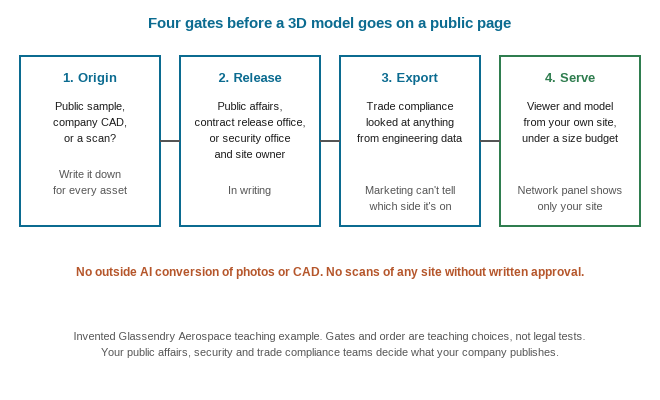
The steps
The step order, the size budget and the lab’s rules are our teaching choices. Where your public affairs or trade compliance team works differently, follow them.
-
Set a size budget first. Pick a file-size limit before you pick a model, and test on a phone over a normal connection. The sample above is well under any sensible limit.
-
Start with a model you are clearly allowed to publish. NASA’s repository calls itself “a growing collection of 3D models, textures, and images from inside NASA” and says “These assets are free and without copyright.” NASA’s media usage guidelines say files “used in the rendition of 3-dimensional models, such as texture maps and polygon data in any format” “generally are not subject to copyright in the United States,” and that “NASA should be acknowledged as the source of the material.” They also say: “If the NASA material is to be used for commercial purposes, including advertisements, it must not explicitly or implicitly convey NASA’s endorsement of commercial goods or services.” Note the scope words, “generally” and “in the United States.” Our reading, to be cautious: a company site is commercial use, so print the NASA credit and a no-endorsement line, use no NASA insignia, and pick a model with no people in it, since the guidelines warn that media with an identifiable person can raise privacy or publicity rights.
-
Use an open-source viewer, and host it yourself. The sample uses Google’s
<model-viewer>web component, released under the “Apache License Version 2.0, January 2004.” That license grants the right to “reproduce, prepare Derivative Works of, publicly display, publicly perform, sublicense, and distribute the Work,” on the condition that “You must give any other recipients of the Work or Derivative Works a copy of this License”. Our reading: bundle the viewer with your site’s own code, keep its license notices, and don’t load it from a third-party server. -
Treat company CAD as an export question first. Under the ITAR, technical data includes information “which is required for the design, development, production, manufacture, assembly, operation, repair, testing, maintenance, or modification of defense articles.” “This includes information in the form of blueprints, drawings, photographs, plans, instructions, or documentation;” The same section excludes public-domain information as defined elsewhere in the rule, and “It also does not include basic marketing information on function or purpose or general system descriptions of defense articles.” (eCFR text; Title 22 last amended 10/21/2026.) Our reading: a model exported from engineering data can sit on either side of that line, and marketing can’t tell which. Trade compliance decides, every time. For the release side of handing files to AI, see our 11/13 piece.
-
Send classified-contract hardware through its own route. Under “Disclosure to the public” in 32 CFR 117.15, the NISPOM says “Contractors will not disclose classified information to the public,” and that unclassified information pertaining to a classified contract needs prior review and clearance as the contract’s classification specification or the government contracting activity sets. That covers material “intended for use in unclassified brochures, promotional sales literature, reports to stockholders, or similar material.” Requests go “through the activity specified in the GCA-provided classification guidance for the contract involved,” with the planned release date and the media for the first release. Contractors “Retain a copy of each approved request for release for a period of one inspection cycle for review by the CSA.” (eCFR text, up to date as of 11/10/2026.) Our reading: a product page is promotional literature, and calling it unclassified is not the test.
-
Never scan a real site on your own. 18 U.S.C. 795, in the unofficial copy (Cornell LII), says that when the President defines certain installations or equipment as needing protection, “it shall be unlawful to make any photograph, sketch, picture, drawing, map, or graphical representation of such vital military and naval installations or equipment without first obtaining permission of the commanding officer”. Executive Order 10104, printed in the notes, reaches places that include “Any commercial establishment engaged in the development or manufacture of classified military or naval arms, munitions, equipment, designs, ships, aircraft, or vessels for the United States Army, Navy, or Air Force.” Whether any site is covered is for your security office and legal. Our reading, and company-policy framing: nobody scans a plant, lab, range, base or customer site without written approval from the security office and the site owner, and a lobby counts. For checking photo sets, see our 11/03 tutorial.
-
No outside AI shortcuts. This is company-policy framing. Don’t send product photos or CAD to an online photo-to-3D service or a chatbot; that puts company files in an outside tool. If AI is allowed at all, it’s the company account, and it never sees engineering files.
-
Build the page and check the network panel. Self-host the viewer and the model, add alt text, the credit line and the no-endorsement line, and load the page on a phone. Open the browser’s network panel and confirm every request goes to your own site.
Try it now: open the 3D model release check lab, choose Case B, and find the asset that the lab stops for a license nobody can name.
- Clear the lab, then send the page to public affairs. Resolve every STOP and every VERIFY with the office that owns it.
The worked example
Invented Glassendry Aerospace, a mid-size satellite subsystem supplier, plans eight 3D assets for a capability page. Its clean record, the lab’s Case A, looks like this:
| Asset | What it is | Where it came from | Release |
|---|---|---|---|
| 1 | Sample satellite model | NASA public release | Public affairs |
| 2 | Product exterior | Company CAD, unclassified | Public affairs |
| 3 | Cutaway of the product | Company CAD, unclassified | Public affairs |
| 4 | Booth layout | Company CAD, unclassified | Public affairs |
| 5 | Lobby walkthrough scan | Company facility scan | Security office and site owner |
| 6 | Customer test range scan | Customer site scan | Security office and site owner |
| 7 | Program hardware exterior | Company CAD, classified contract | Contract release office |
| 8 | Background prop | NASA public release | Public affairs |
Trade compliance cleared Assets 2 to 7, and Assets 1 and 8 carry a recorded government public release. Every asset is self-hosted and under the size budget.
Check your work
STOP means the asset can’t go on the page as recorded. VERIFY means someone checks again. PASS means none of the lab’s rules fired, which is not a release, security or export-control approval. Your counts should match:
| Case | STOP | VERIFY | PASS |
|---|---|---|---|
| A, clean page | 0 | 0 | 8 |
| B, rushed first page | 3 | 1 | 4 |
| C, shortcuts | 3 | 1 | 4 |
| D, second look | 1 | 3 | 4 |
| E, as typed | 2 | 2 | 4 |
| F, wrong sign-off | 3 | 2 | 3 |
Eleven rows in all match two or more rules. The first rule that matches decides the verdict.
Common mistakes
- Only the outside. An exterior from CAD can still carry dimensions. Ask trade compliance.
- Loading the viewer from someone else’s server. Host it with your site.
- Swapping in a compressed model. Some compression makes the viewer fetch decoders from another server. Keep uncompressed models or host the decoders too.
Small contractors and startups. No public affairs or trade compliance office? Name who approves releases (often the founder) and who answers export questions, such as your empowered official or outside counsel if you have one. Until someone can answer the export question, use only public samples like the NASA model, or simple shapes you drew yourself, never a CAD export. Don’t scan anyone’s site.
Limits
The ITAR, NISPOM and U.S. Code sections are quoted from eCFR text and an unofficial copy (Cornell LII), not official editions. None of these sources tells you whether a specific model is releasable, and a PASS in the lab is not a clearance. The rules are our own simple teaching choices. Your public affairs, security and trade compliance teams decide.
Sources
- NASA, NASA-3D-Resources repository (README), GitHub
- NASA, "NASA Images and Media Usage Guidelines," NASA Brand Center
- Google, model-viewer LICENSE (Apache License, Version 2.0)
- 22 CFR 120.33, "Technical data" (ITAR), eCFR text, Title 22 last amended 10/21/2026
- 32 CFR 117.15 (NISPOM), under "Disclosure to the public," eCFR text, up to date as of 11/10/2026
- 18 U.S.C. 795, "Photographing and sketching defense installations," with E.O. 10104 in the notes, unofficial copy (Cornell LII)
- Adapted from AssociationAI, "Put a 3D Scan of Your Venue on Your Website and Keep the File Small"