

Article
Prove Which Image Is Yours: Hashes, Signatures and Content Credentials for Defense Marketing
For marketing, brand and public affairs staff at large defense and space primes: what a file digest, a digital signature and a Content Credential can and cannot show when a doctored copy of your release photo appears, and the release-day habit that makes any of them useful.
Policy Content Credentials Provenance Imagery Public Affairs Brand Defense Space
Who this is for: marketing, brand and public affairs people at a large defense or space prime who publish product, event and executive imagery. Your company bans outside AI tools or allows only a company account, keeps unreleased material out of every outside service, and leaves public statements to public affairs and legal. A labeled box near the end is for small contractors and startups.
This is general information, not legal advice. Your legal, public affairs and security teams decide what your company publishes and how it answers an altered copy.
Teaching example: Invented Ombrecrest Systems and everything that happens to it here are made up. No real company, program, executive, agency or incident is described.
The copy that shows up on a Tuesday
Invented Ombrecrest Systems, a mid-size airborne sensor supplier, released a photo of its pod on a test aircraft at last year’s show. This week the same photo is circulating with a different payload drawn under the wing. By lunch, leadership wants marketing to say which image is real.
That should be easy. It isn’t. An agency exported the file three times, someone renamed it on a shared drive, and the social team resized it. Nobody can say which copy public affairs approved. Someone suggests uploading the suspect image and “the original” to a free online detector, which would hand unreleased material to an outside service and still not settle anything.
Our 11/14 piece covered what to publish and whose permission you need. This one is about proving what you published. The question to keep in your pocket: if a doctored copy of this image shows up tomorrow, which file, record and signature would we point to?
A digest shows the file never changed
A cryptographic hash turns a file into a short digest. NIST’s Secure Hash Standard, FIPS 180-4 (August 2015), puts the purpose plainly: “The digests are used to detect whether messages have been changed since the digests were generated.” It adds: “Any change to a message will, with a very high probability, result in a different message digest.”
Two limits come with that standard. Federal agencies must use either this standard or FIPS 202 wherever a secure hash is required for sensitive unclassified information outside national security systems. Your company doesn’t have to, but NIST says it “may be adopted and used by non-Federal Government organizations.” And NIST notes that “conformance to this Standard does not assure that a particular implementation is secure.”
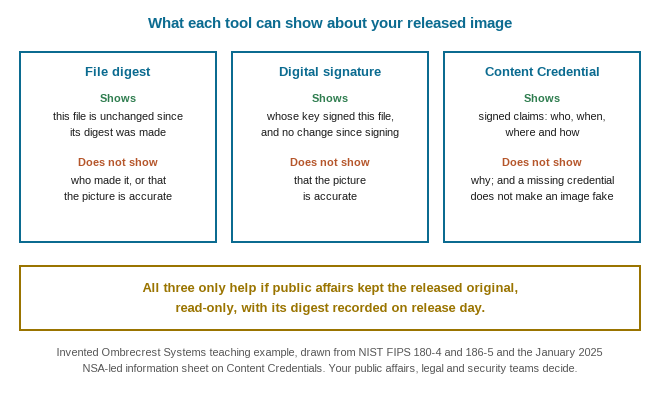
Our reading: a matching digest shows a file is bit for bit the one you recorded. A resized or re-saved copy will not match, so the digest proves your original, not the copy. It says nothing about who made the file or when, unless your record of when you computed it is trustworthy too. A digest can tell you a file never changed. It cannot tell you the picture was ever accurate.
A signature adds who
A digital signature binds a file to a key. NIST’s Digital Signature Standard, FIPS 186-5 (published February 3, 2023), says “Digital signatures are used to detect unauthorized modifications to data and to authenticate the identity of the signatory.” It says a recipient can use one “as evidence in demonstrating to a third party that the signature was, in fact, generated by the claimed signatory,” and that a signature may be used “to detect whether or not the information was modified after it was signed”.
Our reading: a valid company signature shows that your company’s key signed this exact file and that the file hasn’t changed since. It does not show the picture is accurate, and it is only as good as the control your company keeps over the key.
Content Credentials are signed claims
In January 2025, NSA, with cyber agencies in Australia, Canada and the UK, published a Cybersecurity Information Sheet on Content Credentials (U/OO/109191-25). It says it reflects “the current landscape of techniques and threats,” so read it as a snapshot.
The sheet defines the idea: “Content Credentials are defined as metadata that are secured cryptographically and allow creators the ability to add information about themselves or their creative process, or both, directly to media content.” It is careful about what that metadata does. It does not decide whether an image is true; it gives context, and “the metadata provides claims about the content by some entity who verifiably signs those claims.” Because “Content Credentials are cryptographically signed, so any modifications to that signed portion of the media invalidates the signature.”
Metadata can be stripped. For that, the sheet describes adding a digital watermark and “a robust media fingerprint matching system” so credentials can be recovered. It also lists limits worth printing next to the benefits:
- Coverage. “Today, most provenance solutions pertain to image and video content, although capabilities in audio and text are emerging (with text being particularly challenging).”
- Opt-in. “At this time, provenance technologies such as Content Credentials are generally opt-in.”
- Absence proves nothing. “Lack of provenance information should not automatically make media less trustworthy,” since information may be withheld for privacy, proprietary or technical reasons.
- No motive. Credentials “answer the who, when, where, and how parameters of trust, but not the why.”
- Trust lists. “A self-signed certificate is now identified as an untrusted source,” the sheet notes, because C2PA now checks a list of known certificates.
- Archives. “Content Credentials do not protect against media being removed from an archive and that provenance fact being lost.”
Signed metadata answers who and when. Public affairs still answers why.
The habit that makes any of this work
All three tools share one weakness: they help only if someone kept the original, unaltered, from release day. Here is how that looks at a prime. The archive, digest and supplier points rest on the CSI and the NIST standard; the rest is company-policy framing.
- Keep every released original, read-only. The CSI says “It is important for an organization to securely store its media for verification purposes, preferably in read-only format.” Public affairs owns that archive, not a shared drive.
- Make it searchable. When a stripped copy appears, the sheet says “having an accessible database to find the original media with its original credentials is important for verification and provenance.”
- Record the digest on release day. File name, digest, release date and approver, in a log that public affairs controls.
- Sign or credential consistently, where your tools allow. The sheet notes that “if someone consistently uses Content Credentials to sign their media, it becomes more difficult for anyone to credibly claim that a fake image of them is legitimate, given the established practice.” Executive imagery matters most.
- Write metadata into supplier terms. The CSI points to “maintaining metadata throughout interactions with suppliers and subcontractors” and warns that “Any processes that detach or strip metadata degrade the prospects of implementing and/or consuming Content Credentials.” Agencies, event photographers and printers should deliver files with metadata intact.
- No outside detectors. Never upload unreleased images, or the suspect copy, to an online detector, reverse-image site or chatbot. If AI is allowed at all, it’s the company account, under the same review.
- Legal and public affairs decide the response. This article does not say what any court, platform or agency will accept.
For Ombrecrest, the fix is boring and effective. Public affairs pulls the released original from its read-only archive, recomputes the digest, matches the release-day log and checks the signature. That shows which file the company published. Whether and how to say so publicly is their call.
When you use official DoD imagery
Many primes reuse official DoD photos in proposals, booths and web pages. DoD Instruction 5040.02, as amended by Change 2 (effective April 20, 2018), sets the government’s rule. Check the DoD issuances page for the latest version before relying on it.
It says “Official DoD imagery shall not be altered to misinform or deceive,” and “The alteration of official DoD imagery by persons acting for or on behalf of the DoD is prohibited.” Its examples of prohibited alteration “include the addition, changing, or removing of individuals, equipment, scenery, or the unrealistic changing of color or light.” Corrective techniques such as color balancing and sharpening are allowed, but “Any and all image modification or enhancement for any purpose must be disclosed in the caption data so that the image does not mislead or deceive.” The instruction also expects an original source image to be preserved, and allows cropping where it does not misrepresent what was recorded.
Its definition of DoD imagery includes “Imagery recorded or created by DoD personnel including DoD contractors, using U.S. Government-owned or leased equipment and supplies,” and “Imagery acquired by the DoD through contract, donation, or transfer.”
Scope matters. The alteration ban binds people acting for or on behalf of DoD, and whether your team is, for a given image, is for your contracts office and public affairs. Our reading: treat the rule as your floor whenever official DoD imagery is in your material. Correct, don’t change. Caption every edit. Keep the original. For DVIDS endorsement terms, see the 11/14 piece linked above.
Small contractors and startups. Without a public affairs team, pick one person to approve images for release. Keep each released original in a read-only folder, and the same day record its SHA-256 digest and the date in a simple log. Ask your photographer, in writing, to deliver files with metadata intact. If your editing tools can add Content Credentials, turn that on at export. Never run unreleased images through a free online detector.
Common mistakes
- Treating a credential as a verdict. It is a signed claim about who and how, not proof that the picture is accurate.
- Calling an uncredentialed image fake. The CSI says absence alone shouldn’t lower trust.
- Keeping only the resized copy. A digest of a social-media version proves nothing about the original.
- Letting a supplier strip metadata. Put it in the contract before the shoot.
Limits
These sources are a hash standard, a signature standard, a guidance sheet and a DoD instruction. None measures how often fakes appear, how well any detector works, or what any court or platform accepts, so this article makes no such claims. The proof you need on the day a fake appears is the original you saved on the day you released it.
Sources
- NSA, ASD's ACSC, Canadian Centre for Cyber Security and UK NCSC, "Content Credentials: Strengthening Multimedia Integrity in the Generative AI Era," Cybersecurity Information Sheet U/OO/109191-25, January 2025
- NIST, FIPS PUB 180-4, "Secure Hash Standard (SHS)," August 2015
- NIST, FIPS 186-5, "Digital Signature Standard (DSS)," published February 3, 2023
- DoD Instruction 5040.02, "Visual Information (VI)," as amended by Change 2 (effective April 20, 2018); check the DoD issuances page for the latest version
- Adapted from FOUNDINT.AI, "Content Fingerprinting for Foundations: What Hashes, Watermarks and Trap Entries Can Prove"