

Tutorial
A Tag That Isn't Yours: How to Triage an Unknown-Tag Alert After a Trip
Your phone says an unknown tag has been traveling with you. A calm five-step triage for defense and space staff: decide whether the tag is yours, a colleague's or nobody's you know, check by hand because alerts can be late, and report it to company security. Detection and reporting only.
Time needed: About 20 minutes
Before you start:
- Your company security team's contact for travel and device concerns
- A list of the tags you and your team carried on the trip, or a note that there wasn't one
- Your phone, with its own alert steps for unknown tags open in settings
ADSEC Opsec Travel Trade Shows Defense Space
Illustrative example: “Invented Prime Co.”, its staffer and Invented Tag 1 through Invented Tag 6 are invented. No real company, person, product or trip is described.
A proposal manager at Invented Prime Co. is in a shared car on the way home from a three-day show. Her phone shows an alert: an unknown tag appears to be traveling with her. The car holds her own bag, a colleague’s bag and a crate of booth gear. She doesn’t know whether to ignore it, dig through everything, or call someone.
This tutorial covers noticing, checking and reporting, not opening, disabling or interfering with any device; that is company security’s job.
The pocket question: is this tag mine, a colleague’s, or nobody’s I know, and has security heard about it?
Why an unknown tag deserves a check
The IETF working group on detecting unwanted location trackers is writing a threat model for them. It’s a working-group draft (draft-05), not a finished standard, and its scope is personal stalking and abuse, not business travel or espionage. Its opening concern still frames the problem well: “While there are many legitimate uses of these tags, they are also susceptible to misuse for the purpose of stalking and abuse.”
We aren’t claiming tags are used against defense staff. The point is narrower: an unknown tag in your things is worth a calm look, every time.
Why you can’t rely on the alert alone
The same draft notes that protections shouldn’t assume everyone gets a phone alert: “protocols should account for a Target’s lack of access to a smartphone, and scenarios in which Targets cannot install separate software.”
A 2022 peer-reviewed study showed how uneven alerts were then. Its authors wrote that “While Apple provides a stalking detection feature within its ecosystem, billions of Android users are still left in the dark.” Even where alerts existed, they could be slow. In 2022 tests, in one scenario the authors measured: “For iOS, it took more than 4 hours to send a notification.”
Current phones may behave differently; check your own device’s settings and your security team’s guidance.
The tags are also small. The same study notes: “Given the diminutive size of only 3 cm, they can be easily hidden”. So a late alert, or none, doesn’t prove there’s nothing in the bag.
The steps
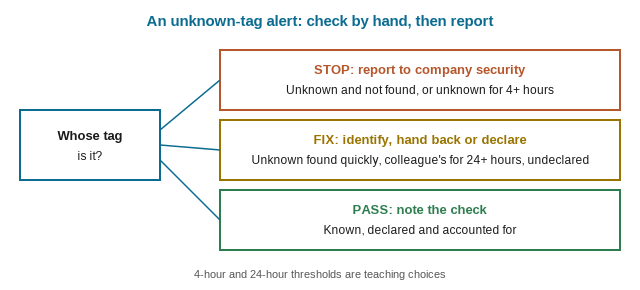
These steps and both time thresholds are our teaching choices, not rules from either source. Your company security team’s guidance comes first.
- Decide whose tag it is. Mine, a known colleague’s, or unknown. If you can’t name the owner, it’s unknown.
- If it’s unknown and you can’t find it, stop and report. Tell company security what the alert showed and when. Don’t try to open or disable anything yourself.
- If it’s unknown and traveled with you for 4 hours or more, report it, even though you found it. The 4-hour line is a teaching choice, not a figure from the 2022 study.
- If it’s unknown and you found it quickly, identify and log it. Use your phone’s own alert steps to identify it, then log it with company security.
- Handle known tags. A colleague’s tag that rode with you for 24 hours or more goes back to them, with a note on the trip sheet; 24 hours is also a teaching choice. Any tag that wasn’t declared before the trip gets added to the trip sheet with company security.
Try it now: open the tag alert triage lab, load Case E, then work out why Invented Tag 1 stops on R1 even though it also traveled with you for 12 hours.
Reading the result
STOP means report now. FIX means a short task. PASS means you note the check in the record. Before the next trip, declare your own and your team’s tags with security so the trip sheet starts complete.
Check your work
Each tag meets the rules top to bottom; the first match decides. The baseline is your own tag, found, 10 hours, declared.
- A, all yours: every tag passes.
- B, unknown tags: two not found and one found after 6 hours: three stop and three pass.
- C, found and undeclared: one unknown found at 2 hours and one undeclared tag of your own: two need a fix and four pass.
- D, colleagues’ tags: two at 30 hours, one also undeclared; the colleague rule comes first there. two need a fix and four pass.
- E, mixed: unknown not found at 12 hours stops on R1; unknown found at 5 hours stops on R2; unknown found at 1 hour and an undeclared colleague’s tag are FIX: two stop, two need a fix, and two pass.
- F, edges: an unknown tag found at 4 hours is STOP and at 3 hours FIX; a colleague’s tag at 24 hours is FIX and at 23 hours PASS; an unknown tag you can’t find stops on R1; and an undeclared tag of your own is FIX: two stop, three need a fix, and one pass.
Common mistakes
- Waiting for a second alert before checking by hand.
- Treating “found it” as the end, when it traveled with you for hours.
- Opening or switching off a tag yourself instead of reporting it.
- Leaving team tags off the trip sheet.
Limits
The IETF document is a working-group draft about personal stalking and abuse, not business travel. The AirGuard results describe software tested in 2022. The 4-hour and 24-hour thresholds are teaching choices, not a standard or law. Follow your own security team.