

Tutorial
Before the Show: A Six-Phone Location Settings Check for Your Team
Before a show team travels, walk each traveler through a short check of app location access, photo location and radios, and keep a dated record. A routine for defense and space marketing teams, built on the NSA's Limiting Location Data Exposure sheet.
Time needed: About 20 minutes
Before you start:
- Your security team's device policy for company and personal phones
- The list of staff traveling to the show
- Ten minutes with each traveler and their phone before departure
ADSEC Opsec Mobile Travel Events Defense Space
Who this is for: marketing and business development team leads at defense and space companies who send staff to shows and need a short, repeatable phone check before anyone leaves.
Everything in the scenario is invented: “Invented Prime Co.” and Invented Phone 1 through Invented Phone 6 are invented. No real company, device or person is described.
The source, and who it’s written for
This routine rests on one document: the National Security Agency’s “Limiting Location Data Exposure” sheet, version 1.1, April 2026. NSA says it is “intended primarily for NSS/DoD system users.” NSS means national security systems. A show team isn’t the sheet’s main audience, so we use only its general points about phones and say where we go beyond it.
Your security team’s device policy comes first. This check never overrides it.
What the sheet says
Four points from the NSA sheet frame the check.
The network always knows. NSA writes that “the cellular provider receives realtime location information for a mobile device every time it connects to the network.”
“Off” isn’t off. In NSA’s words, “disabling location services on a mobile device does not turn off GPS, and does not significantly reduce the risk of location exposure.”
Apps ask for too much. “Many apps request permission for location and other resources that are not needed for the function of the app.” For apps that use location, NSA advises that “location privacy/permission settings for such apps should be set to either not allow location data usage or, at most, allow location data usage only while using the app.”
Photos and radios matter too. “Pictures posted on social media may have location data stored in hidden metadata.” And: “Disable radios when they are not actively in use”.
No setting makes a phone unseen. NSA is plain about it: “Mitigations reduce, but do not eliminate, location tracking risks in mobile devices.”
The scenario
Invented Prime Co.’s show team has six travelers, each with a phone: Invented Phone 1 to Invented Phone 6, or P-01 to P-06. The team lead has ten minutes per person before departure and wants a record that says who was checked, what was found and when.
The checks
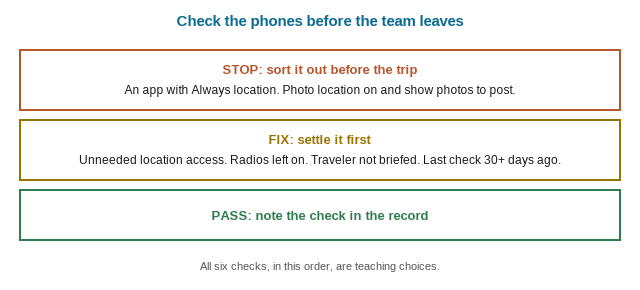
The steps, their order, the STOP and FIX levels and the 30-day interval are our teaching choices, not NSA’s. Run them top to bottom for each phone; the first one that applies sets the verdict.
- STOP if any app has “Always” location. Set it to While using or Never before the trip.
- STOP if photo location tagging is on and the traveler plans to post show photos. Turn off photo location before posting. Tagging alone, or posting alone, doesn’t trigger this check.
- FIX if any app has location it doesn’t need. Remove that access.
- FIX if radios are left on when not in use. Turn them off.
- FIX if the traveler hasn’t been briefed. Tell them that turning off location services doesn’t stop the network from locating the phone.
- FIX if the last check was 30 days ago or more. Check again before the trip. The 30-day line is our teaching choice; 29 days passes.
Anything that clears all six is PASS. Note the check in the record.
For the menu steps on a given phone, use our earlier post, How Americans Can Protect Their Personal Information From ADINT. We don’t repeat those steps here.
Try it now: open the staff phone location check, load Case E, then work out why Invented Phone 2 gets FIX rather than STOP even though its owner plans to post show photos.
Check your work
The baseline is no “Always” app, no unneeded access, tagging off, no posting plans, radios off, traveler briefed and a check 5 days ago.
- All clear (A): every phone clears.
- Stops (B): Phone 1 has an “Always” app, Phone 2 has tagging on with posting plans, and Phone 3 has an “Always” app plus two unneeded: three phones stop and three pass.
- Loose ends (C): Phone 2 has one unneeded app, Phone 3 has radios on and Phone 5’s traveler isn’t briefed: three phones need a fix and three pass.
- Close calls (D): Phone 1 has tagging on but no posting plans, so it passes; Phone 4 at 30 days is FIX; Phone 6 at 29 days passes: one phone needs a fix and five pass.
- Pile-ups (E): Phone 1 stops on its “Always” app ahead of everything else; Phone 2 plans to post with three unneeded apps but tagging off, so it’s FIX; Phone 3 is FIX on radios ahead of its other gaps; Phone 6 stops on tagging with posting: two phones stop, two need a fix, and two pass.
- Boundaries (F): 30 days is FIX and 29 PASS; one unneeded app is FIX; tagging with no unneeded apps passes; an unbriefed traveler at 60 days is FIX on the briefing; an “Always” app is STOP: one phone stops, three need a fix, and two pass.
Common mistakes
These are our teaching notes, not NSA’s.
- Telling travelers that turning off location services makes them invisible.
- Checking company phones and forgetting the personal phone in the same pocket.
- Posting booth photos from the hall without looking at photo location first.
- Running the check once and never recording it.
Limits
This tutorial rests on one NSA sheet written mainly for national security systems and DoD users. The sheet doesn’t measure risk at trade shows, and settings differ by device. The checks and the 30-day interval are teaching choices. No check makes a phone unseen.