

Tutorial
Before the Show: Map Your Team's LinkedIn Connections Locally, and Vet the Strangers
A pre-show routine for defense and space marketing and business-development teams: pull each person's own LinkedIn Connections file, filter it on your own computer for warm introductions to primes and customers, pool names instead of files, and verify every unknown connection request.
Time needed: About 45 minutes per person, plus a short team round-up
Before you start:
- A LinkedIn account for each person taking part
- A spreadsheet app your IT policy allows, installed on a work computer
- The list of companies you hope to meet at the show
Trade Shows Linkedin Opsec Personal Data Govcon Defense Space
Most defense and space teams arrive at a trade show with a clear wish list: the supplier-development lead at a prime you want to team with, the people buying rides to orbit. What they rarely have is a picture of who on their own team already knows those people. That picture is sitting, unread, in each person’s LinkedIn connections.
This routine turns those connections into a shortlist of warm introductions. Each person works on their own computer, the team shares names rather than files, and the routine ends with the step most checklists skip: deciding what to do with strangers who ask to connect once your show plans are visible.
Illustrative example throughout: the “Gulf Coast Space & Defense Expo” and the prime “Northvale Systems” are invented. No real show, company or person is described.
Why the strangers matter as much as the friends
A professional network is useful to you for the same reason it is useful to people you would never want in it. The National Counterintelligence and Security Center warned in April 2025 that “Foreign intelligence entities, particularly those in China, are targeting current and former U.S. government (USG) employees for recruitment by posing as consulting firms, corporate headhunters, think tanks, and other entities on social and professional networking sites.”
That warning is aimed at government employees, but an earlier joint NCSC and FBI release was explicit about industry: “Individuals in the private sector and academic and research communities are also being targeted this way by hostile foreign actors seeking to acquire trade secrets, proprietary data, and information on cutting-edge research and technology.” A marketing team does not need a clearance to be worth approaching. Its contacts are the prize.
The routine
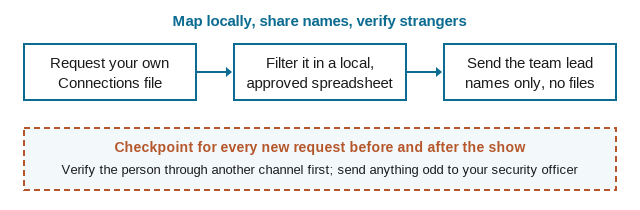
Step 1: Each person requests only their Connections file
Use a managed work computer, never a shared or public one.
- Click the Me icon on your LinkedIn homepage and choose Settings & Privacy.
- Open Data Privacy, then select Download your data under “How LinkedIn uses your data.”
- Tick Connections alone and press Request archive.
Picking one category keeps the wait short. In LinkedIn’s words: “If you select a specific type of data, we’ll email you within minutes. If you select the larger download, you’ll receive an email within 24 hours.” It also leaves less personal data on your disk.
Step 2: Open the file locally and learn its limits
Open the downloaded file in your approved spreadsheet app. Skip online converters and chatbots, which would hand your network to a third party.
LinkedIn’s help page says the Connections file lists your first-degree connections with name, public profile URL, email address, company, position and connection date. Expect gaps: “You may notice in your connection data that some of your connections’ email addresses are missing. That’s because members choose in their privacy settings whether to allow others to download their email address.” Don’t guess the missing addresses.
Two more limits: company and position are whatever each person typed, so they can be stale, and the file shows whom you are connected to, never who knows whom.
Step 3: Filter for the show’s target companies
Put your target list in a second tab: exhibitors you want to meet, primes, launch or payload customers. Next to the company column, add a helper column per target that tests for a partial match, for example =ISNUMBER(SEARCH("northvale",D2)) if company sits in column D. Partial matching catches both “Northvale” and “Northvale Systems Inc.”
Mark each match honestly: worked together, know well, met once, or no idea. Only the first two are introductions.
Try it now: the target-account matcher runs this step in your browser. It opens with an invented target list and Connections file and lists partial company matches per target. LinkedIn is never contacted. Your entries stay put too, except that accepting our analytics banner lets it capture fragments of clicked fields and copied text. A match is a lead to check by hand, not a verified introduction.
Step 4: Pool answers, not files
The team lead sends everyone the target list and collects replies like “I know two people at Northvale; happy to introduce one.” Nobody forwards a spreadsheet.
A shared folder holding every teammate’s export is one document mapping your whole team’s relationships, which is exactly what an elicitation attempt is after. The 2020 release describes that pattern: “Over time, these actors often attempt to elicit information about their targets, their work, and their contacts.” After the show, delete the local exports under your retention policy.
Step 5: Verify every unknown request around the show
Expect more requests once your booth number is public; many are genuine. The rule from NCSC’s 2025 guidance is simple: “Don’t accept online invitations to connect with strangers unless you can validate them first through other means.”
Validate through a channel you already trust: a colleague who knows them, a main switchboard number you looked up yourself, or a face-to-face meeting at the booth. NCSC’s guidance also lists warning signs: flattery, pressure to move the conversation off the platform, offers that seem too generous, and small requests for written reports that later drift toward non-public information. Send anything that fits to your security officer.
Check your result
Run three known-answer tests before trusting the shortlist:
- Search for a company where you know you have exactly three connections. All three should appear.
- Look up someone who changed jobs recently. If their old employer shows, check the shortlist by hand.
- Confirm no export sits in a shared drive, a team chat or an email thread.
Common mistakes
- Counting connections as relationships. A connection from a conference five years ago is not an introduction.
- Accepting a friendly request because it mentions the expo. Show-related small talk is the easiest cover there is.
Describes public guidance and one team routine. Your security officer’s instructions take precedence.
Sources
- LinkedIn Help, "Download your data"
- National Counterintelligence and Security Center (ODNI), "Online Targeting of Current & Former U.S. Government Employees" (April 2025)
- NCSC and FBI, press release on "The Nevernight Connection" (September 30, 2020)
- Adapted from AssociationAI.ai, "See Who You Know: Map Your Association's Hidden Network"