

Tutorial
Map Your Campaign's Data Footprint Before Launch
A pre-launch inventory for marketing teams: one table that records what a campaign discloses at setup, audience onboarding, delivery, and measurement, and gets each partner's retention and onward-sharing answers in writing.
Time needed: About 60 minutes
Before you start:
- Your media plan or campaign setup document
- A spreadsheet or shared document for the map
- Access to the platform or agency contact who will run the campaign
ADSEC Campaign Security Data Inventory
Most marketing teams can describe a campaign precisely: the audience, the message, the budget, the flight dates. Far fewer can say where that campaign’s information goes once it leaves the building — which names and files are handed to which platforms, what an auction broadcasts on the campaign’s behalf, and what keeps collecting data after the flight ends. This tutorial builds that record before launch, while every entry is still cheap to change.
It helps to keep four moments separate, because data moves differently at each one. At setup, people type names, budgets, and targeting choices into platforms they do not own. At onboarding, audience material is uploaded or switched on. At delivery, the campaign competes for impressions: in programmatic buying, a bid request goes out to prospective buyers describing the opportunity, bid responses come back, and the winning ad is shown in public. At measurement, tags and tools report what happened. A footprint map gives each moment its own row.
The discipline has a short name: know your data — the kinds and volumes a campaign touches, how they are used, and where they go. Nothing here is a legal determination about any particular campaign. The operational point stands on its own: you cannot evaluate a disclosure you have not written down.
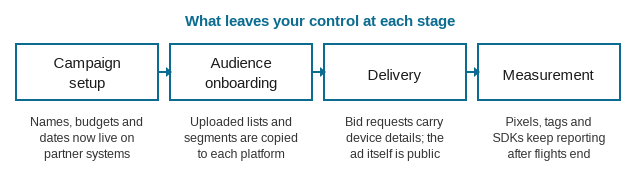
The map you will build
One table, four rows, four columns. The columns never change:
| Stage | What is shared | Who can see it | How long it is kept |
|---|---|---|---|
| Campaign setup | Every name, label, budget, and targeting setting entered into a platform or sent to a partner | ||
| Audience onboarding | Every list, segment, pixel-fed pool, and location setting used to build the audience | ||
| Delivery | What goes out when impressions are bought, and what comes back | ||
| Measurement | Every pixel, tag, SDK, and reporting arrangement attached to the campaign |
Step 1 — Lay out the four stages and fill in the delivery row first
Create the table and start with delivery, because it is the stage teams understand least and control least. When an impression is sold through an auction, the seller side sends a bid request to connected buyers. The IAB Tech Lab’s standards material describes OpenRTB, the protocol behind many of those auctions, as using standardized objects that detail the impression, the playback environment, the device, the application, and the content — and it specifies that in an OpenRTB bid request, the “device” object carries the device information. Which additional fields a given request carries depends on the platform and the deal; record what your platform actually sends rather than assuming a universal list.
Note two things in the delivery row. First, a bid request is not a copy of your dashboard: your campaign’s human-readable name is a label in the buying platform’s interface, and it is not the same thing as the identifiers and objects a request carries. Second, delivery is a chain, not a single counterparty. The same Tech Lab material describes a SupplyChain Object that lets buyers see the parties selling or reselling a bid request, and a sellers.json mechanism for discovering the identities of intermediaries — both exist because requests routinely pass through hands beyond the first platform. In the “who can see it” cell, write the chain as far as your partner can describe it, and mark the rest as unknown rather than guessing.
Step 2 — Record every name and label, then rename what gives the game away
Go through the media plan and the platform setup screens and list every name the campaign will use: campaign and ad group names, audience and segment names, the file names of uploads and creative, landing page paths, and any campaign parameters appended to your links. For each one, ask what a stranger could learn from the label alone. Flag anything that discloses strategy (a product line not yet announced), timing (an event or milestone date), or a customer relationship (a client’s name, a contract reference, a program office). A segment called “expo-attendees” says one thing; a segment named after the customer whose booth the attendees visited says considerably more.
Where the platform allows it, rename flagged labels to neutral ones before launch, and record both versions in the map so the team can still trace them. Be clear-eyed about what this does and does not buy. A neutral label stops the label itself from telling the story; it reduces one channel of inference. It does not anonymize the underlying audience data, it does not change how devices are tracked, and it does not hide the campaign — the creative runs in public, and anyone who sees the ad alongside its timing and landing page can still draw conclusions. Treat renaming as closing a leak, not as camouflage.
Step 3 — Record the audience inputs, with a source and an owner for each
Now the onboarding row. List every input used to build or exclude the audience:
- List uploads: customer or member exports, event attendee lists, suppression files — anything sent to a platform to be matched or excluded.
- Always-on collection: a pixel or tag on your own site or app that feeds a retargeting pool.
- Location settings: geofences, radius targeting, place lists, or location segments bought from a data provider.
Next to each input, record where it came from (which system, whose export) and who owns it on your side (the person or team accountable for it). If a platform describes protective handling for an upload — for example, that identifiers are hashed before matching — write down that this is the platform’s stated handling, and note what it leaves unchanged: the platform can still build and use the audience, and the people in it are still the people in it. An input with no named owner is a finding in itself; fix that before launch, not after an incident.
Step 4 — Record the measurement stack and what each piece collects
Fill in the measurement row: every conversion pixel, tag manager container, app SDK, verification or brand-safety vendor, and any clean room arrangement the campaign will use. For each one, write what it collects (page views, conversions, device signals, location of an impression), where its reports live, and whether the account belongs to you, your agency, or the vendor. Measurement tools are easy to forget because they are installed once and inherited by every later campaign — including this one.
This is also where your own properties belong on the map. A tracking pixel or software development kit installed on your website or app discloses whatever it collects every time it fires, whether or not anyone has inventoried it since the day it was installed. A tag on your site is a disclosure you chose, and it belongs in the same inventory as the ones your partners chose.
Step 5 — Put three questions to every partner, in writing
For each platform, agency, and demand-side partner on the campaign, send the same three questions and file the answers beside the map:
- How long do you retain the data this campaign sends you — uploads, settings, and reporting data?
- Do you share any of it onward, and if so, with whom and for what purpose?
- Who are your subprocessors for this account?
Ask in writing and keep the replies with the campaign record. Responsibility for what your campaign discloses does not transfer to a counterparty, and a partner’s good standing is not a substitute for your own record. A partner’s answer is a statement about their current configuration, not a permanent guarantee — which is why Step 6 exists. Where a partner does not answer, write “not answered” in the map. An honest blank is more useful than an assumption, and it tells you where to press before money moves.
Try it now: the footprint map lab reviews an invented four-stage map for empty stages, unanswered retention and sharing questions, and labels that give the strategy away. Your work stays in the browser. The one exception is the site’s optional analytics: once accepted, it may log a snippet of any field you click and of anything you copy.
Step 6 — File the map with the campaign record and set its re-run triggers
Save the finished map in the same place as the media plan and the signed insertion order, with your name and today’s date on it. Then agree, in the document itself, on the events that reopen it: a new partner or platform joins the buy; a new audience input is added; targeting changes, including any location setting; the creative or landing page changes; or a partner announces new terms or subprocessors. When any of those happen, update the affected rows and ask the Step 5 questions again for anything new. A footprint map is a snapshot of a configuration, and configurations drift — the map earns its keep by being re-run, not by being written once.
Check your result
You are done when all of the following are true:
- Every stage row is filled in, including a delivery row that describes the chain of recipients as far as your partners can name it.
- Every campaign name, audience name, and file name has been reviewed, and each flagged label is either renamed or carries a written reason for staying as it is.
- Every audience input names its source system and an accountable owner on your side.
- Every measurement tool lists what it collects and whose account it reports into.
- Every partner has the three Step 5 answers on file, or an explicit “not answered” entry.
- The map is stored with the campaign record, dated, with its re-run triggers written into it.
Mistakes and limits
- Mistaking the label for the footprint. Names are one disclosure channel. Lists are uploaded, requests are broadcast, and tags fire regardless of what anything is called.
- Reading a rename as anonymity. Neutral labels reduce inference from the label; they do not prevent device tracking, do not seal the audience data, and do not make a public ad private.
- Filling “who can see it” with a single company. Auctions and resale chains involve intermediaries. If your map shows one name per row, it is describing your contract, not the data flow.
- Treating the map as inspection. This exercise records what you send, what partners say, and what standards documents describe. It cannot see inside a partner’s systems, and it will not catch sharing a partner does not disclose.
- Skipping the legal questions it raises. If an entry surprises you — an upload you did not know existed, a location setting near a sensitive site, a partner who cannot answer the retention question — that is a prompt to involve your legal or compliance team. This tutorial is general information about campaign hygiene, not legal advice about your obligations.