

Tutorial
Keep Every Supplier Day Sponsorship Promise, With Evidence
Turn a signed supplier day sponsorship into a delivery register: each benefit with its conditions, an owner who said yes, evidence defined in advance, and a sponsor update that covers only what is unresolved.
Time needed: About 40 minutes
Before you start:
- The signed sponsorship agreement, not the sales brief
- The names of the teams that will deliver each benefit
Sponsorship Events Privacy Defense Space
By the end of this guide you’ll have a delivery register for one sponsorship: every agreed benefit with its conditions attached, an owner who accepted it, the evidence that counts as done, and a short update for the sponsor that covers only what is still open.
Illustrative example: “Halvard Ridge Aerospace,” its Supplier Day on December 3, 2026, the sponsor “Cobaltline Fasteners” and every detail below are invented for teaching. No real company, event or agreement is described.
The situation
Halvard Ridge Aerospace makes space hardware and hosts a supplier day for its subcontractors and component suppliers. Cobaltline Fasteners signed a sponsorship that includes three benefits:
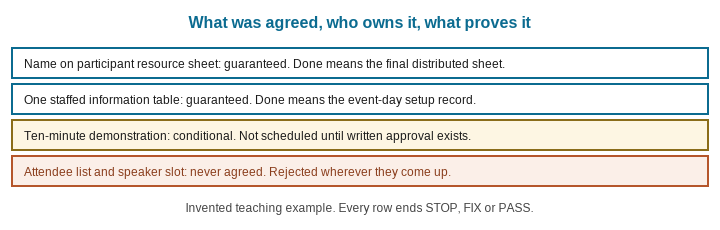
- its name on the participant resource sheet, with artwork due November 12 and print approval due November 19;
- one staffed information table, set up from 7:30 to 8:00 a.m. on the day, with Halvard Ridge supplying the table and Cobaltline its staff;
- a ten-minute demonstration, subject to program director approval, which hasn’t been given.
Two weeks out, two more asks keep turning up in email threads: an attendee list and a speaker slot. Neither is in the agreement. For a defense audience, an attendee list would name government and program people, so that one is a firm no.
Build the register
- Extract what was agreed from the signed agreement, with every condition attached. Work from the agreement, not the sales brief or the kickoff notes. If you ask an AI tool to draft the list, check the conditional sentence yourself. A tool that summarizes “subject to approval” as “includes a demonstration” has turned a maybe into a promise, and the tool can’t interpret the agreement for you.
Try it now: the sponsor fulfillment register opens with an invented supplier-day sponsorship: three agreed benefits, one of them conditional, and two asks that were never agreed. Set each row’s status, owner and evidence, and it marks every item STOP, FIX or PASS and drafts an update covering only what is unresolved. It sends nothing and grants nothing.
-
Add the never-agreed asks as rows and mark them rejected. Writing them down is how you stop them coming back. If anyone marks one as in progress, the register should say so plainly. The lab’s update line for the list is: “An attendee list is not part of the agreement and will not be shared.”
-
Give each agreed benefit an owner who said yes. Communications owns the resource sheet, Events owns the table, and Program owns the demonstration decision. Putting a team’s name in the column isn’t enough. As the lab puts it, “A proposed owner is not an owner.” Ask, and record the yes.
-
Define the evidence for done before the event. For the resource sheet, done means the final distributed sheet, not a proof sent for review. For the table, done means the event-day setup record. A reminder email counts for nothing here. In the lab’s words, “Activity is not delivery.” While you’re defining evidence, check the attendee experience too. W3C’s Making Events Accessible checklist says “Provide accessibility information, such as the accessible routes between meeting rooms.” and “Consider including accessibility requirements in any contracts.” It’s planning guidance, so it won’t certify a table location or a document for you.
-
Draft the exception update before you need it. Let an AI tool summarize only the rows that are unresolved, then have your partnerships lead review it and send it. When a benefit slips past its checkpoint, don’t offer a substitute on the spot. The lab’s rule is: “Escalate to the agreement owner before offering any substitute.” For the demonstration, the honest line stays conditional until approval exists: “Conditional and not approved. It is not scheduled or guaranteed.”
A worked check
Say it’s November 20. The resource sheet proof has been sent but not approved, so the November 19 checkpoint has passed without the evidence that counts. The register flags that row for escalation, and the draft update to Cobaltline says the proof is being prepared for approval. The table row is on track. The demonstration is still conditional and unapproved, which is fine as long as no one has scheduled it. The two never-agreed rows stay rejected. The draft update lists only the late resource sheet. Nothing about a list or a speaker slot appears in it, because neither was ever promised.
Check your result
- Every agreed benefit has a status, an owner who accepted it and the evidence that means done.
- The conditional demonstration isn’t marked scheduled unless written approval is on file.
- The attendee list and speaker slot appear only as rejected.
- You measure progress as guaranteed benefits delivered with evidence on time, not reminders sent.
Mistakes that feel like progress
Working from the brief instead of the agreement. Sales notes often describe what the sponsor hoped for.
Counting activity as delivery. A proof sent, a reminder sent or a meeting held isn’t the benefit.
Letting a conditional benefit drift into the schedule. Once it appears on the run of show, everyone treats it as promised.
Handing over attendee data to smooth things over. It wasn’t agreed, and for your guests it’s never yours to give. Your security office sets the visitor rules for the day.