

Article
Your Email Filter Doesn't Cover Your Earbuds: Bluetooth at Shows and Hotels
A strict AI, email and device policy governs the inbox and the corporate laptop. It doesn't switch off the radios staff carry onto a show floor or into a hotel. What NCSC told government attendees about conference tracking tags, what NSA and NIST say about Bluetooth, why range and discoverability matter, and a short show-week routine for defense and space teams.
ADSEC Opsec Trade Shows Conferences Defense Space
Illustrative example: “Invented Aerospace Co.” and its business development manager below are invented. No real company, show, hotel or person is described.
Invented Aerospace Co. runs a tight program. Unapproved AI tools are blocked at the network edge. Suspicious mail lands in quarantine before anyone sees it. Nobody pastes program detail into a chatbot, and the annual training says so twice. Its business development manager knows every one of those rules by heart.
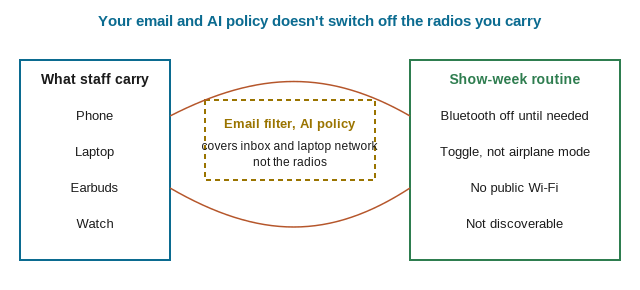
On the first morning of a regional defense show, she walks the hall with a company phone, a company laptop in her bag, wireless earbuds in her ears and a fitness watch on her wrist. Every rule she was trained on is about the inbox and the network. None of them says anything about the four radios she is carrying past a few thousand strangers.
That gap is the subject of this article. A strict email and AI policy is doing its job. It just doesn’t reach the radios in your pocket.
What the government has said about conference floors
One government source does speak to the show floor, though it was written for government staff, not contractors. In an April 2024 bulletin, the National Counterintelligence and Security Center (NCSC) noted that “Conference hosts increasingly use this technology by attaching tracking tags to event lanyards, access keycards, and informational binders.” The technology it means is Bluetooth Low Energy tracking tags. NCSC warned government personnel that third parties able to break into those tags’ Bluetooth connections “can collect location data on USG personnel and track in real-time their movements.”
That warning is scoped to U.S. government attendees. It doesn’t say the same risk applies to every contractor at every show, and we aren’t claiming it does. It does show that the badge on your lanyard is itself a radio worth asking about.
The other sources below are general guidance for device users and organizations, plus one academic paper. None of them names hotels, and the hotel setting in this article is our own framing: a crowded place where staff carry many paired devices and IT support is far away. We aren’t reporting incidents at any property.
What NSA tells device users
The National Security Agency publishes a one-page sheet of mobile device best practices. Three lines on it bear directly on show week.
The first is plain: “Disable Bluetooth ® when you are not using it.” The second explains why the shortcut most travelers reach for isn’t enough: “Airplane mode does not always disable Bluetooth ®.” So don’t take the airplane icon as proof. Check the Bluetooth setting itself.
The third line covers the hotel lobby and the convention center network: “DO NOT connect to public Wi-Fi networks.” Your company may already enforce this on managed laptops. In our framing, the gaps are more likely on phones and on the tablets used to run booth demos.
The sheet dates from 2021 and is written for device users in general, not as a rule for your company.
What NIST tells organizations
NIST’s Guide to Bluetooth Security is written for the people who set device policy. Among its recommendations, it lists “ensuring that Bluetooth devices are turned off when they are not needed to minimize exposure to malicious activities.” That’s the same advice NSA gives individuals, aimed at the organization that has to make it stick.
Two other points in the NIST guide explain why the advice matters more in a crowd than at a desk.
Range is not a comfort
Bluetooth is designed for short distances, so it’s tempting to assume that only the person sitting next to you could ever reach your earbuds. The NIST guide warns against that assumption: “Attackers may be able to intercept communications at significantly larger distances, especially if they use high-gain antennas and high-sensitivity receivers.”
In a packed exhibit hall or a busy hotel bar, the number of people within ordinary range is already large. If someone brings better equipment, the circle grows, and you have no way to see who is inside it.
Discoverable devices can be followed
The guide also explains a quieter problem. Describing a device that broadcasts a fixed address, it notes: “If that device remained discoverable, its location could easily be tracked by an adversary.”
Modern low energy devices can use addresses that change over time, and NIST notes that this reduces the problem. Older accessories, or devices left in a pairing or discoverable state, may not get that protection.
Even standard-compliant devices have had flaws
A 2019 academic paper is a reminder that the Bluetooth standard itself has had weaknesses.
The paper, presented at USENIX Security 2019 by Antonioli, Tippenhauer and Rasmussen, described an attack it called KNOB. The authors stressed that “The attack is standard-compliant”. In other words, it worked within the rules of the specification rather than exploiting one vendor’s bug. They also reported that their “results demonstrate that all tested devices are vulnerable to the KNOB attack.”
Treat this as history. It describes the devices the authors tested in 2019, and we aren’t claiming any device you carry today is open to it. The point for a show-week planner is narrower: a radio being on and compliant has not, historically, meant it was beyond attack. The safest radio is the one that’s switched off.
Why a strict policy still misses this
Policies like the one at Invented Aerospace Co. are built around channels such as email, file sharing, removable media and AI tools. Those controls sit on mail servers, network gateways and managed laptops.
A radio in a pocket bypasses all of them. No filter sees a pairing request. No gateway logs a nearby device listening to a discoverable accessory. The quarantine folder never fills up because nothing arrives by mail. That’s why a team can be well trained and still walk into a hall with every radio on.
A short show-week routine
The routine below is our own teaching method, not a requirement from any source cited here. It turns their general guidance into steps a booth team can follow. Check it against your own company’s policy and your security team’s advice first.
- Radios off until needed. Before you leave the hotel room, switch Bluetooth off on your phone and laptop. Turn it on only for the accessory you’re using right then, and off again after.
- Check the toggle, not airplane mode. Look at the Bluetooth setting itself. Don’t assume airplane mode covers it.
- Ask about the badge. If the show hands out a lanyard, keycard or binder, ask the organizer whether it carries a tracking tag, and tell your security team what they say.
- Leave unneeded accessories home. If you won’t use the speaker, the spare earbuds or the second watch, don’t pack them. Unpair accessories you no longer use.
- Stay off public Wi-Fi. Use company-approved connectivity for anything work related, including booth demo tablets.
- Don’t leave devices discoverable. Finish pairing at home, before the trip, and don’t leave a device in pairing mode on the show floor.
- Report anything odd to your own team. An unexpected pairing prompt or an unknown device in your list goes to your security team, not to a search engine.
Limits
The NCSC bulletin is a 2024 warning written for government personnel, not contractors. The NSA sheet is general device guidance from 2021. The NIST guide covers Bluetooth security for organizations. The KNOB paper describes devices tested in 2019. No source here is about hotels; that setting is our framing. This article isn’t a security assessment of any device or venue, and your security team’s rules come first.
The pocket question for show week: which of my radios is on right now, and does anything need it to be?
Sources
- National Counterintelligence and Security Center, ETD Bulletin 2024-10, Conference Tracking Tags: Risk Considerations (April 2024)
- National Security Agency, Mobile Device Best Practices (2021)
- NIST SP 800-121 Rev. 2 (update 1), Guide to Bluetooth Security
- Antonioli, Tippenhauer and Rasmussen, The KNOB is Broken: Exploiting Low Entropy in the Encryption Key Negotiation of Bluetooth BR/EDR (USENIX Security 2019)